
The Ultimate 7-Step Technical SEO Setup Guide for B2B Growth
A beautiful website that nobody can find is not an asset; it is a liability.
Many B2B companies invest heavily in custom web applications or headless e-commerce stores, only to see their organic traffic flatline. They hire marketing agencies to write blog posts and build backlinks, but the needle doesn’t move. Why? Because the underlying digital infrastructure is fundamentally broken.
Search engines do not see your stunning UI design. They see your DOM structure, your server response times, and your JavaScript execution. Furthermore, if your analytics tracking is misconfigured, you have zero visibility into user behavior, making it impossible to calculate an accurate return on investment (ROI).
Technical SEO Setup and Analytics Architecture: Turn Your Website Into a Measurable Growth Engine
A well-designed website that nobody can find is not an asset. It is an expense.
Many B2B companies invest heavily in custom web applications, headless storefronts, or professionally designed service pages — and then watch their organic traffic sit flat for months. They hire content agencies. They build backlinks. They publish case studies and whitepapers. The rankings do not move.
The reason is usually not the content. It is the infrastructure underneath it.
Search engines do not see your visual design. They see your DOM structure, your server response times, your JavaScript rendering behavior, and your crawl budget allocation. If those elements are broken or misconfigured, your content does not get indexed — and content that does not get indexed does not generate traffic, regardless of how well it is written.
A proper technical SEO setup is the foundation that makes everything else work. It ensures that search engine crawlers can reach your pages, understand your content hierarchy, and index your most valuable landing pages without hitting dead ends, redirect chains, or rendering errors.
Beyond crawlability, there is the analytics side. If your GA4 tracking is misconfigured, your conversion data is unreliable. If your Google Search Console is not set up correctly, you have no visibility into what Google actually sees when it visits your site. You are making marketing decisions based on incomplete or inaccurate information — and that compounds over time into wasted budget.
At MarkupMarvel, we fix both sides of this problem. Our technical SEO setup and analytics configuration work covers the full infrastructure layer: Core Web Vitals, site architecture, crawl error remediation, GA4 event tracking, and Google Tag Manager deployment. We do not hand you an audit report and leave your team to figure it out. We write the code that fixes the issues directly.
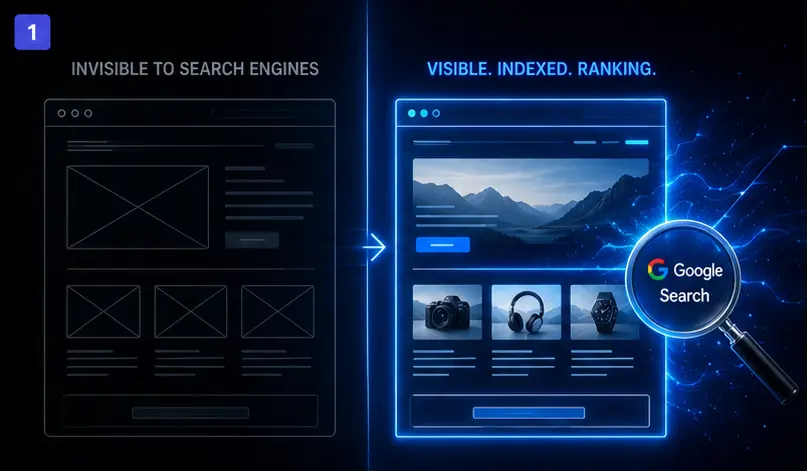
1. What a Technical SEO Setup Actually Covers
Technical SEO is the process of optimizing a website at the server and code level so that search engine crawlers can reach, interpret, and index your pages efficiently. It has nothing to do with keyword research or content strategy. It operates underneath all of that.
A complete technical SEO setup covers several interconnected systems:
Site crawlability and indexation. Search engines send automated crawlers to discover and index your pages. If your robots.txt file blocks the wrong paths, if your internal link structure creates orphaned pages, or if your sitemap contains URLs that return errors, those pages do not get indexed. They simply do not exist in search results.
JavaScript rendering. A growing number of websites — particularly those built on React, Vue, or Next.js — rely heavily on client-side JavaScript to render content. Search engine crawlers handle JavaScript differently from a standard browser. If critical content only appears after JavaScript executes, and the crawler cannot execute that JavaScript correctly, your pages may be indexed as blank or near-empty. This is one of the most common causes of ranking failure for modern web applications.
Site speed and Core Web Vitals. Google uses real-world performance data to evaluate user experience. Largest Contentful Paint, Interaction to Next Paint, and Cumulative Layout Shift are the three signals that directly affect your search ranking. A site that loads slowly or shifts layout during load scores poorly on these metrics — and suffers ranking consequences regardless of content quality.
Structured data and schema markup. Schema tells search engines not just what your page contains, but what type of content it is — a product, a service, a review, an FAQ, a local business. Properly implemented schema markup increases your eligibility for rich results in Google Search, which improves click-through rates significantly.
Canonical tags and duplicate content. Many websites unintentionally create multiple URLs that serve the same or very similar content. Without canonical tags, search engines split ranking signals across those URLs instead of consolidating them on the page you want to rank. This dilutes your domain authority and suppresses your rankings.
These are not problems a content agency can fix. They require developers who understand both how search engines work and how to write the code changes that resolve the issues.
2. Why Standard SEO Agencies Cannot Solve Engineering Problems
Most SEO agencies are built around content production and link acquisition. Those are legitimate disciplines. But when the underlying technical infrastructure is broken, content and links cannot compensate.
A traditional agency approach to technical SEO usually goes like this: run an automated audit tool, export a spreadsheet of flagged issues, and hand it to your internal team with a set of recommendations. The recommendations are often accurate. But executing them requires a developer who understands server configuration, JavaScript rendering, structured data, and CMS-level code changes.
Most businesses do not have that person available, or they have a developer whose time is already committed to product work. The audit report sits in a folder. The issues stay unresolved. The rankings do not improve.
Because MarkupMarvel builds custom web applications from the ground up, our technical SEO setup work is executed by the same engineers who write production code. We do not identify the problem and hand it off. We identify it and fix it — in the codebase, at the server level, in the CMS configuration.
This is the practical difference between a technical SEO audit and a technical SEO setup. One tells you what is wrong. The other fixes it.
3. Core Web Vitals and Performance Optimization
Google officially incorporated Core Web Vitals into its ranking algorithm. These are not soft guidelines — they are measurable signals that affect where your pages appear in search results.
The three signals are:
Largest Contentful Paint (LCP) measures how long it takes for the main content element on your page to become visible. A good LCP is under 2.5 seconds. Sites that fail this threshold are flagged as slow by Google, which affects both rankings and user bounce rates.
Interaction to Next Paint (INP) measures how quickly your page responds when a user interacts — clicks a button, opens a menu, submits a form. High INP scores indicate sluggish JavaScript execution, often caused by heavy third-party scripts or unoptimized event listeners.
Cumulative Layout Shift (CLS) measures visual stability. If page elements — images, banners, font blocks — shift position while the page loads, users click the wrong things and lose trust in the experience. CLS is frequently caused by missing image dimension attributes or late-loading web fonts.
Our technical SEO setup process includes a detailed Core Web Vitals audit using Google PageSpeed Insights and real user data from the Chrome User Experience Report. We then implement targeted code-level fixes: image optimization and lazy loading, critical CSS inlining, JavaScript deferral, server-side caching rules, and CDN configuration. The goal is not just to pass the threshold — it is to score well enough that performance becomes a competitive advantage rather than a ranking liability.
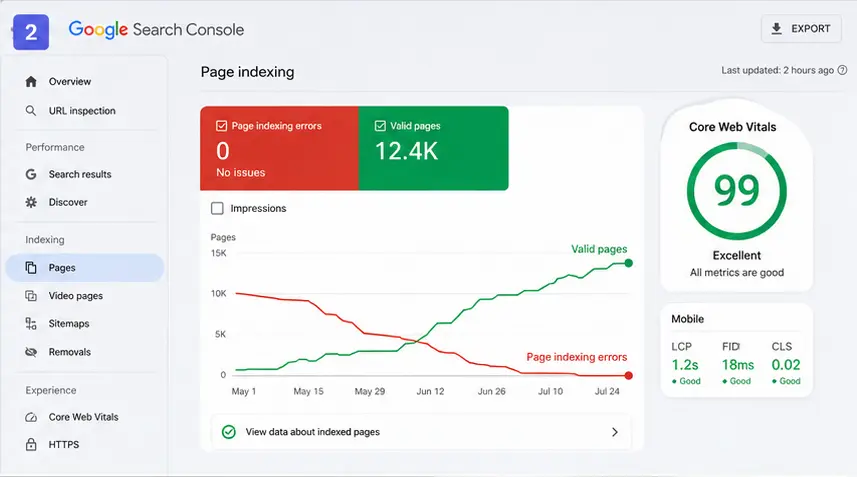
4. Google Search Console Remediation and Indexing
Google Search Console is the direct communication channel between your website and Google. It shows you which pages are indexed, which pages have been flagged with errors, and how your site is performing in organic search. Most businesses have it connected but never look at it closely enough to act on what it shows.
Common indexing problems we find and resolve through our technical SEO setup work:
Coverage errors. Pages returning 404 errors, soft 404s, or server errors that should be ranking instead sit outside the index entirely. We identify these, fix the underlying cause, and verify reindexing through Search Console.
Crawl budget waste. Large sites with thousands of pages need to use their crawl budget efficiently. If Google spends its allocated crawl time on low-value pages — parameter URLs, paginated archives, thin content pages — your high-value landing pages get crawled less frequently. We implement proper noindex directives and canonicalization to direct crawl budget toward the pages that matter.
Sitemap errors. An XML sitemap containing URLs that redirect or return errors sends contradictory signals to Google. We audit and rebuild sitemaps to reflect only the canonical, indexable URLs on your site — and submit them cleanly through Search Console.
Manual actions and security issues. If your site has received a manual action from Google for thin content, unnatural links, or a security issue, that flag will suppress your rankings until it is resolved and the reconsideration request is approved. We handle the resolution and submission process.
5. GA4 Configuration and Custom Event Tracking
Out-of-the-box Google Analytics 4 tracks pageviews and basic session data. For most B2B businesses, that is not enough information to make meaningful decisions about marketing spend or conversion optimization.
A proper GA4 technical SEO setup goes further. We deploy Google Tag Manager as the central management layer for all tracking scripts, which keeps your site code clean and makes future tracking changes manageable without touching the codebase directly.
We then configure custom event tracking for the specific actions that indicate real business value on your site:
- Form submissions segmented by form type and landing page
- Whitepaper and resource downloads
- Video play events and completion percentages
- Scroll depth on long-form service pages
- Click events on high-value CTAs and phone number links
- Multi-step funnel progression for quote request or booking flows
Beyond event setup, we configure GA4 conversions, build custom audiences for remarketing, and connect GA4 to Google Search Console for integrated search and behavior reporting. The result is a data environment where you can see not just how many people visited your site, but what they did, where they came from, and which actions preceded a lead or a sale.
According to Google Analytics documentation, GA4 is built around an event-based model designed specifically for this kind of granular behavioral tracking — but it requires deliberate configuration to realize that capability.
6. Frequently Asked Questions About Technical SEO Setup
Q1: Why is my website not ranking despite publishing regular content?
Search engines cannot rank what they cannot efficiently crawl and index. Issues like poor Core Web Vitals, slow server response times, misconfigured robots.txt files, JavaScript rendering failures, or bloated redirect chains often prevent Google from properly indexing your pages — regardless of how strong the content itself is. A technical SEO setup audit usually uncovers the specific bottleneck within the first review.
Q2: Do you fix the issues found in a technical SEO audit, or just report them?
We fix them. Our technical SEO setup work is executed by developers, not content strategists. We implement the code changes, server configuration updates, and CMS-level fixes directly. You receive a resolved site, not a spreadsheet of recommendations your team needs to action separately.
Q3: Do you configure custom event tracking in GA4?
Yes. Our technical SEO setup service includes full GA4 custom event configuration via Google Tag Manager. We track B2B conversion actions specific to your business — form submissions by type, resource downloads, video engagement, CTA clicks, and multi-step funnel progression — so your analytics data reflects actual business activity rather than just pageviews.
Q4: Can fixing technical SEO issues reduce our customer acquisition cost?
Yes. Improving organic search visibility through a proper technical SEO setup reduces dependency on paid advertising for traffic. More accurate analytics tracking also eliminates the budget waste that comes from optimizing campaigns based on incomplete or miscounted conversion data. Both effects lower your effective cost per acquired customer over time.
Q5: Does your technical SEO setup service cover JavaScript-rendered websites?
Yes. We regularly work with React, Next.js, Vue, and other JavaScript-heavy frameworks where rendering behavior directly affects indexation. We test how Google actually renders your pages, identify content that is not being picked up by the crawler, and implement the appropriate fix — whether that is server-side rendering, static generation, or a targeted pre-rendering strategy.
Q6: How long does a full technical SEO setup take?
For a standard corporate or SaaS website, the initial audit, issue prioritization, and first round of fixes typically takes 3 to 5 weeks. More complex sites with large page counts, multiple subdomains, or significant crawl errors take longer. We provide a scoped timeline during the discovery phase so your team knows exactly what to expect.
Stop Guessing. Start Measuring.
Your competitors are not outranking you because their products are better. In many cases, they are outranking you because their technical infrastructure is built correctly and yours is not.
A plugin cannot fix a JavaScript rendering issue. A content calendar cannot resolve a crawl budget problem. A blog post cannot compensate for a misconfigured canonical structure that is splitting your domain authority across duplicate URLs.
Real search visibility requires developers who understand both how search engine algorithms process websites and how to write the code changes that align your site with those requirements. That is what our technical SEO setup service delivers — not recommendations, but resolved infrastructure.
MarkupMarvel has executed technical SEO setup and analytics configuration for B2B service companies, SaaS platforms, and enterprise e-commerce operations. We know where modern web applications fail from a search and measurement perspective, and we know how to fix those failures at the root.



