

Zero-Downtime Website Migration: 5 Proven Steps to Move Safely

Zero-Downtime Website Migration: 5 Proven Steps to Move Platforms Safely
Zero-downtime website migration is not a luxury reserved for enterprise tech teams with unlimited budgets. It is a standard engineering practice that any business running a revenue-generating website should demand before agreeing to any platform move.
The fear is real. You have spent years building your search rankings, your customer base, and your conversion funnel. The idea of taking your website offline for hours — or days — while a migration happens feels like gambling with everything you have built. Lost sales, broken user experiences, dropped search rankings, and a support inbox full of confused customers.
But here is what most people are not told: none of that has to happen. A zero-downtime website migration, executed correctly, means your website stays fully live and fully functional throughout the entire process. Your customers keep shopping. Your search rankings keep climbing. Your team keeps operating. And when the migration is complete, users land on the new platform without ever knowing a switch happened.
This guide breaks down exactly how zero-downtime website migration works — the architecture behind it, the five phases you need to execute in order, the mistakes that derail most migrations, and what to look for when choosing a technical partner to manage the process.
What Is Zero-Downtime Website Migration?
A zero-downtime website migration is a structured replatforming process that keeps your website fully operational and accessible to users while all data, content, and traffic are transitioned to a new server or platform. No maintenance pages. No broken checkouts. No “we will be back soon” banners.
The approach works by running two environments simultaneously — your existing live website and the new platform — and only switching user traffic over once the new environment has been fully built, tested, and verified. Because both systems are active at the same time, there is no gap where users encounter a broken or missing website.
This is fundamentally different from a traditional migration, where teams take the website offline, move files and databases, and then bring the new version live. That approach made sense when websites were static brochures. It does not make sense when your website is processing orders, generating leads, and serving thousands of users around the clock.
For businesses where the website is the primary revenue channel, zero-downtime website migration is not optional. It is the only responsible way to move platforms.
Why Zero-Downtime Website Migration Matters for Your Business
Revenue Continuity
Every minute your website is offline during a migration is a minute where customers cannot buy from you. For an eCommerce store generating even modest revenue, an eight-hour maintenance window can represent thousands of dollars in lost sales — and that does not account for the customers who leave during downtime and never come back.
A zero-downtime website migration eliminates that risk entirely. Transactions continue processing on your existing platform right up to the moment traffic switches to the new one.
SEO Protection
Search engines do not forgive extended downtime. If Googlebot attempts to crawl your website and finds it unavailable for several hours, it begins to treat those pages as temporarily unavailable. If the downtime extends, rankings drop. In severe cases, pages can be de-indexed entirely.
A properly executed zero-downtime website migration maintains continuous crawler access throughout the entire process, which means your SEO equity transfers intact rather than being damaged during the move.
Customer Trust
Users who encounter a maintenance page during a migration do not think “how professional, they are upgrading their infrastructure.” They think “this website is broken” and they go to a competitor. That impression is hard to undo even after your site comes back online.
Zero-downtime website migration means your customers never see the migration happening. Their experience is uninterrupted, and your brand reputation stays intact.
Operational Safety
The dual-environment approach that makes zero-downtime migration possible also provides a critical safety net. If something goes wrong during the new environment’s deployment — a configuration error, a performance issue, a broken integration — you can simply leave traffic on the legacy system while the issue is resolved. No one is affected. No one even knows there was a problem.
The Architecture Behind Zero-Downtime Website Migration
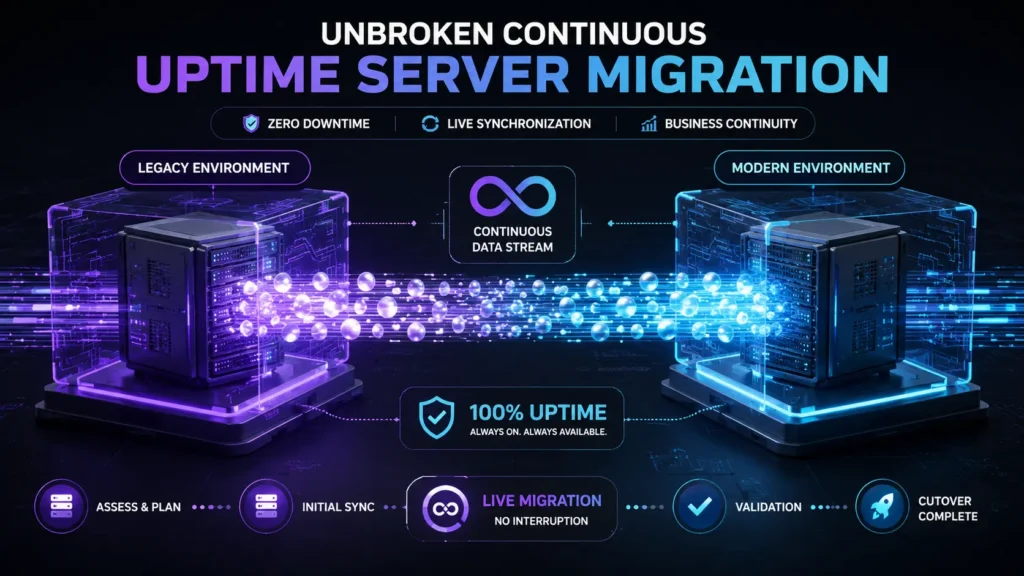
Understanding how zero-downtime website migration works at a technical level helps you ask the right questions and make better decisions about how your migration is managed.
The core concept is called dual-environment architecture. Instead of taking your current website offline and rebuilding it on a new server, engineers create a complete new environment on the destination server while the existing website continues running normally. Users keep hitting the old server. The new server is built, configured, and tested entirely in the background.
The challenge this creates is data synchronization. Your existing website is not static — orders come in, accounts are created, content is updated. All of that activity happens on the live server while the new environment is being built. Engineers handle this through delta synchronization — periodic scripts that capture only the new data generated since the last sync and transfer it to the destination server. By the time the final switch happens, the two environments are nearly identical in terms of data.
The final piece is DNS routing. The Domain Name System is what tells browsers which server to connect to when someone types your URL. Changing the DNS record to point to the new server is what actually switches user traffic. Because DNS changes can take time to propagate globally, engineers reduce the DNS Time-to-Live (TTL) setting days before the migration — cutting propagation time from 24-48 hours down to five minutes. This means that when the switch happens, global traffic reaches the new server almost instantly.
For a deeper technical reference on how DNS works and how public DNS infrastructure operates, you can check:
Google Public DNS documentation
For a comprehensive technical reference on how DNS propagation works and how TTL settings affect routing speed, the Google Public DNS documentation covers the underlying mechanics in detail.
The 5-Phase Zero-Downtime Website Migration Process
Phase 1 — Pre-Migration Audit and Planning
A zero-downtime website migration is 80% planning and 20% execution. Teams that skip or rush the planning phase are the ones who end up with broken redirects, missing pages, and dropped rankings after launch.
The pre-migration audit covers everything that needs to be accounted for before a single file moves:
– Full content and asset inventory covering every page, image, PDF, video, and downloadable file on the current website
– Technical SEO baseline capturing all meta titles, descriptions, canonical tags, heading structures, and schema markup so nothing is lost in translation
– URL architecture mapping that documents every existing URL and identifies which ones will change on the new platform
– Third-party integration audit cataloging every external connection including payment processors, CRM systems, ERP integrations, analytics tools, and marketing platforms
– Performance baseline using Core Web Vitals data so you can verify the new platform outperforms the old one after launch
This audit becomes the master reference document for every subsequent phase of the migration.
Phase 2 — URL Architecture and 301 Redirect Strategy
If your URL structure changes during the migration — which it often does when moving between platforms — every changed URL needs a 301 redirect pointing from the old path to the new one. Without this, every page that changes URL becomes a dead link for users and loses its accumulated search authority.
For official technical guidance on how 301 redirects work and how search engines process them:
Google 301 Redirect documentation
This is one of the most commonly mishandled aspects of zero-downtime website migration. Teams either implement redirects incorrectly, miss pages entirely, or handle them at the application layer instead of the server level where they belong.
A properly executed redirect strategy for zero-downtime website migration includes:
– A complete 1-to-1 mapping spreadsheet matching every legacy URL to its destination equivalent
– Server-level 301 redirect implementation rather than plugin-based or application-layer redirects
– Handling for orphaned pages — retired content that no longer has a direct equivalent — either mapped to the most relevant category page or served a clean 410 Gone response
– Redirect chain elimination to ensure no redirect points to another redirect
For the technical standard on how search engines handle 301 redirects and how to implement them correctly to preserve SEO equity, Google’s official documentation is the authoritative reference.
Phase 3 — Dual-Environment Build and Testing
With the planning complete, the new environment is built on the destination server. This is where the actual platform work happens — theme configuration, custom development, integration setup, content migration, and performance optimization.
The critical requirement during this phase is that the staging environment must be completely hidden from search engines. If Google crawls both your live site and your staging environment simultaneously, it will find duplicate content and may penalize both. This is prevented through a combination of robots.txt rules blocking crawlers and HTTP basic authentication requiring a password to access the staging URL.
Testing before launch in a zero-downtime website migration should cover:
– Functional testing of every interactive element including forms, checkout flows, account creation, and search functionality
– Integration testing confirming every third-party connection works correctly in the new environment
– Performance testing validating that server response times, Core Web Vitals scores, and page load speeds meet or exceed the current platform
– User acceptance testing giving business stakeholders the opportunity to navigate the staging environment, run test transactions, and approve the experience before launch
Phase 4 — Database Synchronization and Final Preparation
For dynamic websites where users are constantly creating accounts, placing orders, and updating content, database synchronization is the most technically demanding part of zero-downtime website migration.
There are two approaches depending on the complexity of the platform:
Content freeze approach works for lower-complexity websites where administrators can pause content publishing and new account creation for a brief window — typically 24 to 48 hours — while users continue interacting with the live site normally. The database is synchronized during this window and then locked before the final switch.
Delta synchronization is required for high-volume eCommerce platforms and SaaS applications where pausing activity is not practical. Specialized scripts capture every database change generated after the initial migration dump and apply those changes to the destination server in near real time. In some cases, dual-write configurations are used to write new transactions to both servers simultaneously right before the switch, eliminating any possibility of data loss during the handover.
Final preparation also includes reducing the DNS TTL to 300 seconds — five minutes — several days before the planned launch date. This ensures that when the DNS record is updated on launch day, global traffic reaches the new server within minutes rather than hours.
Phase 5 — DNS Switch and Post-Launch Monitoring
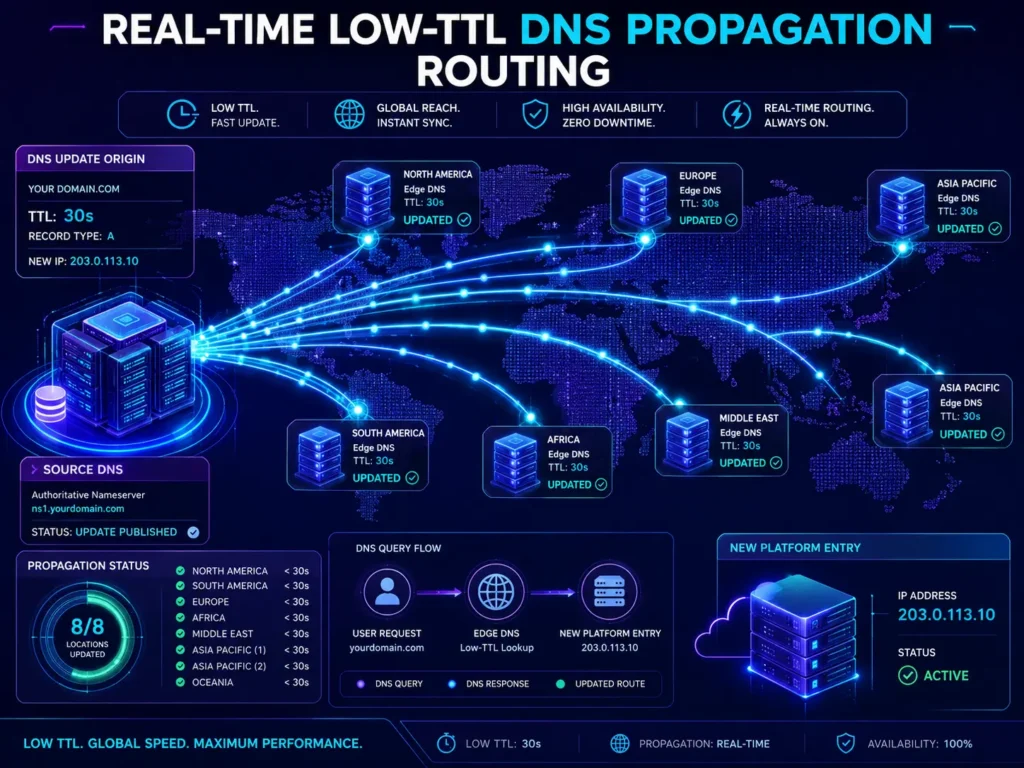
Launch day for a zero-downtime website migration is anticlimactic by design. Because the new environment is fully built, tested, and synchronized, the actual switch is a single DNS record update that takes effect globally within minutes.
After the DNS switch, the migration team monitors both environments closely:
– Server logs on both the legacy and destination servers to confirm traffic is routing correctly
– Real-time error monitoring for any 404 responses, failed redirects, or broken integrations
– Google Search Console for any crawl errors, indexing anomalies, or coverage issues that appear in the hours after launch
– Analytics data to confirm user sessions, conversion rates, and bounce rates are performing within expected ranges
– Payment processing confirmation that transactions are completing successfully on the new platform
One critical post-launch check specific to zero-downtime website migration: verify that the robots.txt file on the live production environment does not contain the crawl-blocking rules from the staging configuration. Leaving a Disallow: / rule active on the live site will prevent search engines from indexing the new platform — a mistake that can take weeks to recover from.
Zero-Downtime Website Migration — Phase Summary
Phase 1 — Planning
Map all legacy URLs and draft complete 1-to-1 redirect documentation to eliminate 404 errors and protect search authority. Catalog every API endpoint, third-party hook, and platform extension to ensure business software continues operating correctly after launch.
Phase 2 — Staging
Deploy the new platform inside a password-protected staging environment to enable complete code evaluation without public visibility. Configure strict robots.txt blocks across all staging URLs to prevent search engines from indexing duplicate content.
Phase 3 — Testing
Execute automated test transactions, form submissions, and data queries to validate all user conversion paths and system performance. Reduce DNS TTL to 300 seconds to prepare global networks for near-instant route switching on launch day.
Phase 4 — Execution
Run the final delta database synchronization to capture all new data generated on the live platform and apply it to the destination server. Update the DNS A-record to the destination server IP address, routing all international user traffic safely to the new platform.
Phase 5 — Post-Launch
Audit server logs and monitor Google Search Console for any crawl anomalies or indexing errors. Verify robots.txt configuration, redirect functionality, and payment processing are all operating correctly on the live production environment.
Common Mistakes That Derail Zero-Downtime Website Migrations
Forgetting to Reduce DNS TTL in Advance
If you update your DNS record without first reducing the TTL, global propagation can take 24 to 48 hours. During that window, some users hit the old server and some hit the new one — creating fragmented sessions, split database writes, and a nightmare for data integrity. Reduce TTL to 300 seconds at least three days before your planned launch date.
Leaving Crawl Blocks Active After Launch
The robots.txt rules that protect your staging environment from being indexed will destroy your live site if they carry over to production. Always verify the robots.txt file on your live domain immediately after the DNS switch and confirm there are no Disallow rules blocking search engine access.
Plugin-Only Redirect Implementation
Handling your 301 redirects entirely through WordPress plugins or application-layer redirect rules introduces performance overhead and creates single points of failure. Server-level redirect implementation is faster, more reliable, and does not depend on your CMS being fully functional to execute correctly.
Hardcoded Staging URLs in Production Assets
During the build phase, staging domain references often get embedded in image paths, CSS files, JavaScript variables, and configuration files. If these are not found and replaced before launch, they create broken asset references the moment the legacy server goes offline.
Scheduling the Switch During Peak Traffic
Executing the DNS switch during your highest-traffic periods introduces unnecessary risk. Even a perfectly planned zero-downtime website migration benefits from being executed during your lowest historical traffic window — typically early morning on a weekday — where any unexpected issues affect the fewest possible users.
Skipping Analytics Reconnection
Google Tag Manager containers, server-side tracking proxies, conversion pixels, and heatmap tools all need to be verified and reconnected on the new platform. Forgetting this step means you lose business intelligence data from the moment of launch, making it impossible to validate whether the migration improved or damaged your performance metrics.
Frequently Asked Questions About Zero-Downtime Website Migration
Q: How long does a zero-downtime website migration take?
A: For a standard business website, the planning and execution process typically takes two to four weeks. Large eCommerce platforms or enterprise SaaS applications with complex database requirements often require two to three months of staging and testing before the final DNS switch.
Q: Is true zero downtime actually achievable?
A: Yes. By maintaining parallel active environments and using low-TTL DNS propagation, users experience completely uninterrupted access throughout the migration. The transition is invisible to end users when executed correctly.
Q: Will my search rankings drop during a migration?
A: If the migration is executed correctly with proper 301 redirects, maintained crawler access, and no staging configuration leaking into production, your rankings should be preserved and often improve as the new platform delivers better Core Web Vitals scores.
Q: How do we prevent losing eCommerce orders during the final switchover?
A: Delta database synchronization scripts capture all orders and account activity generated on the live platform right up to the DNS switch moment. In high-volume scenarios, dual-write configurations ensure no transaction is missed during the handover window.
Q: Do we need an agency to manage our zero-downtime migration?
A: For websites that generate significant revenue, process transactions, or depend heavily on search traffic, working with an experienced technical team is strongly recommended. The cost of a failed migration — in lost revenue, dropped rankings, and data recovery — almost always exceeds the cost of professional migration management.
Q: What happens if something goes wrong after the DNS switch?
A: Because the legacy environment remains active during the propagation window, rolling back is straightforward — update the DNS record to point back to the old server and traffic returns within minutes. This safety net is one of the most important advantages of the dual-environment approach.
How MarkupMarvel Manages Zero-Downtime Website Migrations
At MarkupMarvel, zero-downtime website migration is a core technical competency — not a service we offer as an add-on. Every migration we manage starts with a comprehensive pre-migration audit, a complete URL redirect mapping exercise, and an explicit performance baseline so we can demonstrate measurable improvement after launch.
We build new environments on isolated staging infrastructure, execute delta database synchronization for high-volume platforms, and manage the DNS transition with real-time monitoring across both environments. Our post-launch process includes 48-hour active monitoring of server logs, Search Console data, and conversion metrics to catch and resolve any issues before they affect your business.
Whether you are moving from a legacy WordPress setup to a headless Next.js architecture, migrating from Shopify to a custom Laravel platform, or replatforming a multi-vendor marketplace from a plugin-based setup to a properly engineered custom build, we bring the same structured approach to every migration engagement.
The result is a migration your customers never notice — because from their perspective, nothing changed except that your website suddenly got faster.
Final Thoughts: Zero-Downtime Website Migration Is the Only Responsible Approach
If your website generates revenue, captures leads, or serves customers around the clock, there is no version of a migration that justifies taking it offline. The technical approach to achieve zero-downtime website migration has been established and refined over years of enterprise deployments. It is not experimental. It is not reserved for companies with massive engineering teams. It is a structured, executable process that any competent technical partner can deliver.
The cost of getting it wrong — lost revenue, damaged rankings, broken customer trust, and expensive data recovery — is always higher than the cost of doing it right the first time.
Plan the migration properly. Build in parallel. Test exhaustively. Switch with confidence.
More Blog

High-Availability Cloud Infrastructure: 5 Proven Steps

Nginx Redis Caching Optimization: 6 Proven Speed Tactics

Content Optimization for AI Search: 5 Proven Steps to Rank



