

Website Fails to Convert? 7 Proven Reasons Why

Why Your Website Fails to Convert: UX, Speed, Messaging, and Tracking Issues
Introduction: The Hidden Leak Draining Your Revenue
Website fails to convert due to UX problems, slow loading speed, unclear messaging, and broken tracking affecting user behavior and conversions.
Visitors land on your site ready to take action, but something stops them. Maybe the page loads too slowly. Maybe they cannot find the button they need. Maybe your headline does not speak to their problem. Whatever the reason, they leave — and your marketing budget goes with them.
Before you invest in new ad campaigns or redesign your homepage, you need to find and fix the structural problems that are quietly killing your conversions. For businesses, B2B platforms, and growing digital brands, identifying these issues early is the critical first step toward turning traffic into predictable, consistent revenue.
Short Answer: Why does a website fail to convert?
A website fails to convert when it has poor user experience, slow load times, unclear messaging, or broken data tracking. The fix starts with making your site load in under three seconds, ensuring it works properly on mobile devices, communicating your value clearly within five seconds of a visitor landing, and setting up proper event tracking so you know exactly where users drop off.
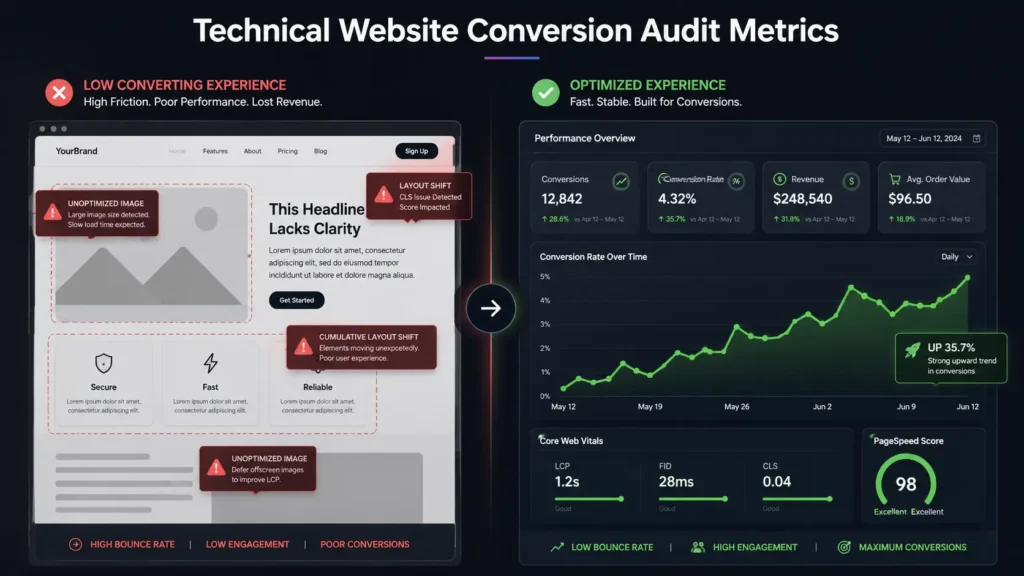
1. Why Your Conversion Rate Controls Your Marketing ROI
For agencies, SaaS platforms, and eCommerce brands, a website is not just a digital brochure. It is your most important sales tool, working around the clock. When your website fails to convert, you are effectively wasting every dollar you spend to drive traffic to it.
The Real Cost of a Leaky Funnel
Every visitor you bring in through paid ads or organic search costs money. When those visitors do not convert, your cost per customer rises — sometimes to the point where growth becomes impossible.
Why More Traffic Is Not the Answer
Sending more visitors to a broken experience does not help. Fixing the conversion problems first means that every future campaign dollar goes further. According to Google’s research on page experience, user engagement signals directly influence how search engines rank your content — meaning a site that fails to convert also tends to rank lower over time. (Source: web.dev/vitals)
Small Gains, Large Revenue Impact
Even a 0.5% improvement in your conversion rate can produce a significant increase in annual revenue. That is why conversion rate optimization (CRO) consistently delivers one of the highest returns on investment of any digital marketing activity.
2. UX and Interface Problems That Push Visitors Away
A visually impressive website that is difficult to use is a liability, not an asset. If a visitor cannot find your main call to action within the first few seconds of landing, they will close the tab and move on.
Too Much Going On
Cluttered layouts with competing animations, multiple sidebars, and unclear visual hierarchy force visitors to work too hard to understand what you are offering. Clarity always wins over visual complexity. Every element on the page should have a single purpose: moving the visitor closer to taking action.
Mobile Experience Is Not Optional
The majority of web traffic — including B2B traffic — now comes from mobile devices. If your website was designed primarily for desktop screens and then squeezed onto mobile, the result is broken layouts, text that is too small to read, and buttons that are too close together to tap accurately. This is one of the most common reasons a website fails to convert for mobile users specifically.
According to Statista, mobile devices account for over 60% of global web traffic. If your mobile experience is poor, you are losing the majority of your potential customers. (Source: statista.com)
Navigation That Goes Too Deep
Apply a simple rule: if a visitor has to click more than three times to reach your pricing page, contact form, or main service — your navigation is too deep. Every additional click is an opportunity for someone to give up and leave.
3. Page Speed: The Conversion Killer You Cannot See
Speed is not a technical detail. It is a business-critical feature. When your website fails to convert despite good traffic numbers, slow load times are often the hidden reason.
What Google Measures and Why It Matters
Google’s Core Web Vitals measure three key aspects of how your site performs for real users:
– Largest Contentful Paint (LCP): How long it takes for the main content to appear on screen. Should be under 2.5 seconds.
– Interaction to Next Paint (INP): How quickly your site responds when a user clicks or taps something. Should be under 200 milliseconds.
– Cumulative Layout Shift (CLS): How much the page moves around while loading. A high CLS score means buttons and text jump around, causing users to click the wrong thing.
All three scores directly affect both user experience and your search ranking. Poor scores mean visitors leave faster and Google ranks you lower — a double penalty.
What Slows Sites Down
Common causes of slow load times include large uncompressed image files, too many third-party scripts running at once, slow server response times, and excessive use of plugins that add weight without adding value.
The Headless Option for Data-Heavy Sites
For websites that process large amounts of content or run complex back-end systems, a headless web architecture separates the front-end display layer from the back-end data layer. This means pages can be pre-rendered and delivered instantly from global servers, regardless of how complex the underlying system is. If your current site struggles with speed despite optimization efforts, explore our Headless Web Architecture and API Integration services [/services/headless-web-architecture/] to see if this approach fits your stack.
According to Google’s research on page experience, user engagement signals directly influence how search engines rank your content.
4. Messaging Misalignment: When Your Words Do Not Connect
One of the most overlooked reasons a website fails to convert is messaging that simply does not resonate with the visitor. You might have excellent services and a well-designed site, but if your words do not quickly address what the visitor actually needs, they will not stay.
The Five-Second Rule
Within five seconds of landing on your page, a visitor should be able to answer three questions:
1. What does this company do?
2. Is this for someone like me?
3. Why should I choose this over the alternatives?
If your headline is vague, your subheadline talks about your company history, or your hero section uses industry jargon that only insiders understand — you have already lost most visitors before they scroll.
Jargon Is a Conversion Killer
Technical language, buzzwords, and corporate-sounding phrases create distance between you and your visitor. Replace terms like “end-to-end solutions” or “synergistic frameworks” with plain descriptions of what you actually do and what problem you solve.
Trust Signals Matter for High-Value Decisions
For B2B services and premium products, visitors need to feel confident before they take action. If your site lacks client logos, case study results, verified testimonials, or recognizable credentials, visitors have no reason to trust you over a competitor. Trust signals are not decorative — they are a critical part of the conversion path.
5. Tracking Blind Spots: You Cannot Fix What You Cannot See
The fifth major reason a website fails to convert is that the business has no clear picture of what is actually happening on the site. Tracking total page views or overall session counts tells you almost nothing useful about why people are not converting.
The Problem with Vanity Metrics
Metrics like total monthly visitors or average time on page feel meaningful but rarely point to actionable problems. A visitor can spend five minutes on your pricing page out of confusion, not engagement. Page view counts do not tell you that.
What Event-Based Tracking Actually Tells You
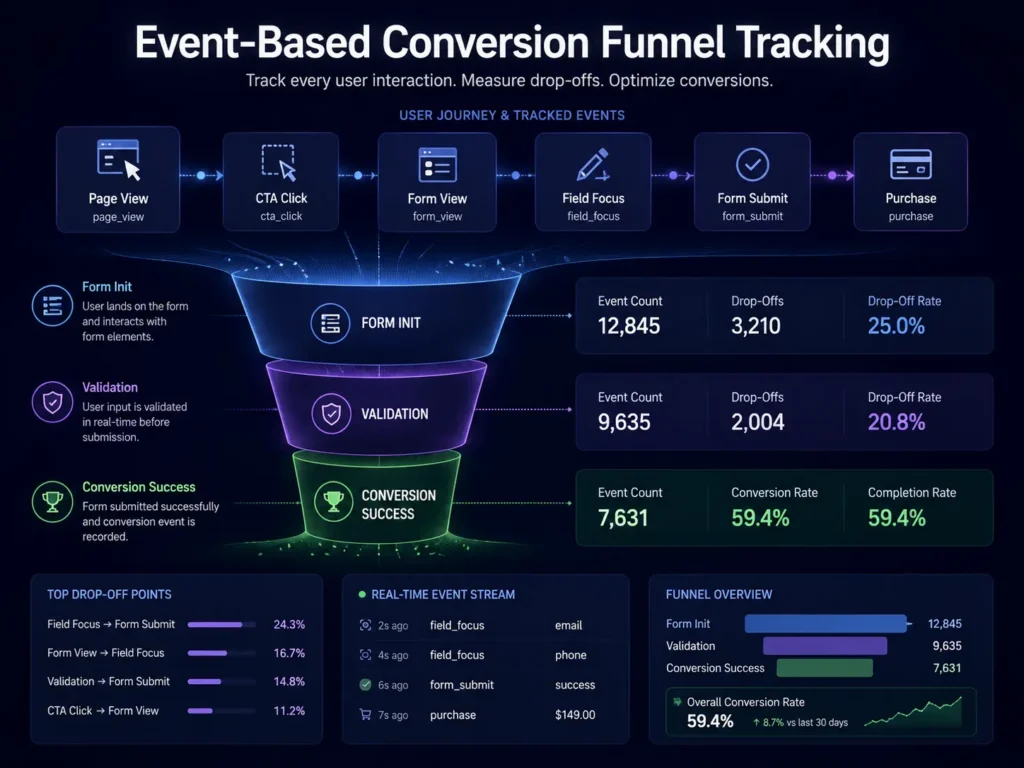
Proper event tracking monitors specific user actions:
– Did the visitor click the primary CTA button?
– Did they start filling out the contact form but stop halfway?
– Did they watch the explainer video past the 50% mark?
– Did they click an outbound link to a case study?
Each of these data points tells you something specific about where the conversion process is breaking down. Without this data, you are guessing — and optimization based on guessing is slow and expensive.
GA4 and Google Tag Manager Setup
Google Analytics 4 (GA4) combined with Google Tag Manager (GTM) gives you a powerful, flexible system for tracking these events without hard-coding changes into your site every time. According to Google’s official documentation, properly configured GA4 event tracking is the foundation of any serious conversion rate optimization program. (Source: support.google.com/analytics) If your current setup is incomplete, our Technical SEO and Analytics Setup service [/services/technical-seo-analytics/] can configure the full event tracking structure your site needs.
If your GA4 setup is missing key conversion events or your GTM tags are not firing correctly, every campaign you run is producing data you cannot trust.
6. Performance Diagnostic Table: Symptoms and Fixes
Common Conversion Problems and Their Root Causes
User Behavior Symptom | Technical Root Cause | Recommended Fix
High immediate bounce rate | Slow server response or mismatched title tags | Compress images, enable a CDN, correct meta titles
High traffic with zero leads | Vague value proposition or hidden CTAs | Run A/B tests on headlines; move primary CTA above the fold
High mobile cart abandonment | Broken mobile layout or overly long checkout forms | Apply mobile-first CSS; reduce checkout to essential fields only
Declining organic search rankings | Broken metadata or missing schema markup | Run a full technical SEO audit; fix schema errors
Low form completion rate | Too many required fields or no trust signals near the form | Reduce form fields; add testimonials or security badges near submission
7. Critical Mistakes That Keep Your Website Failing to Convert
Even experienced teams make mistakes that quietly destroy conversion performance. Here are the most common ones to watch for and eliminate:
Over-Relying on Plugins
Adding plugin after plugin to a WordPress site is tempting because it feels like adding features. In reality, each additional plugin adds scripts, database queries, and potential conflicts that slow your site down and introduce security risks. Audit your plugins regularly and remove anything that is not essential.
Building for Desktop First
Designing exclusively on a large monitor and then trying to make it work on mobile is a recipe for broken layouts. Always design from the smallest screen size outward. Mobile-first design ensures the experience works everywhere, not just on the device your team uses to build it.
Ignoring Core Web Vitals
Optimizing for keywords alone while ignoring Core Web Vitals is a strategy that no longer works. Modern search engines factor page experience signals into rankings. A site that is keyword-rich but slow and unstable will consistently underperform a faster, cleaner competitor.
Generic CTA Copy
Button text like “Submit” or “Click Here” does not tell the visitor what they are getting. Use specific, benefit-focused language instead: “Get My Free Audit,” “See Pricing,” or “Start My Project Today.” Small copy changes on CTAs can produce meaningful lifts in click-through rates.
Skipping A/B Testing
Making layout or copy changes based on internal opinion instead of live user data leads to slow progress. Even basic A/B testing — comparing two headline versions or two CTA placements — gives you real evidence about what actually works for your specific audience.
Launching Campaigns Before Fixing Tracking
Running paid traffic to a site with broken or incomplete GA4 event tracking means you cannot tell which campaigns are producing revenue and which are wasting budget. Always verify your tracking setup before launching any paid campaign.
Frequently Asked Questions
How long does it take to see conversion improvements after a site audit?
Technical fixes like speed improvements and layout corrections typically show measurable results within the first 30 days. SEO-related improvements, such as better rankings from fixing metadata and schema errors, take longer — usually three to six months for consistent results.
Can a slow page load time really hurt my revenue?
Yes, significantly. Research from Google shows that as page load time increases from one second to three seconds, the probability of a visitor bouncing increases by 32%. Every fraction of a second added to your load time costs you conversions. (Source: think.storage.googleapis.com)
What matters most for high-value B2B conversions?
Clear, direct communication of what you do and who you help — supported by verifiable proof. B2B buyers visit your site looking for a specific solution to a specific business problem. Your interface needs to show them you understand that problem and have solved it for others like them.
Should we fix SEO issues or UX problems first?
Both are connected, so neither should wait. Sending traffic to a site with poor UX destroys the engagement metrics that search engines use to evaluate your content. The right order is: fix technical performance first, then fix UX and messaging, then optimize for search intent.
Do we need a full redesign to fix our conversion rate?
Not always. A targeted conversion rate optimization audit can identify specific friction points — a slow-loading section, a buried CTA, a form with too many fields — and fix them without rebuilding the entire site. Start with an audit before committing to a redesign.
How does MarkupMarvel approach conversion performance?
Our team at MarkupMarvel builds clean, performance-optimized WordPress sites that are designed to convert from the ground up. We handle Core Web Vitals optimization, mobile-first layout engineering, GA4 event tracking setup, and conversion-focused UX design — all within a structured process that prioritizes measurable results over surface-level aesthetics.
Conclusion: Fix the Foundation Before You Scale
When a website fails to convert, adding more traffic is not the answer. The answer is identifying and removing the specific barriers that are stopping your visitors from taking action — whether that is slow load times, a confusing layout, messaging that does not connect, or analytics that cannot tell you what is actually happening.
At MarkupMarvel, we specialize in building and optimizing WordPress websites that are engineered for conversion performance. From Core Web Vitals improvements and mobile-first design to GA4 tracking setup and CRO audits, we handle the technical work that turns a website from a passive brochure into an active revenue driver.
If your current site is bringing in traffic but not generating leads or sales, the problem is fixable — and you do not need to start from scratch to fix it.
Ready to find out exactly why your website fails to convert?
More Blog

High-Availability Cloud Infrastructure: 5 Proven Steps

Nginx Redis Caching Optimization: 6 Proven Speed Tactics

Content Optimization for AI Search: 5 Proven Steps to Rank



