
Vendor Dashboard Development for Marketplaces in 7 Steps

How to Scale Vendor Dashboards for Large Marketplace Platforms
Vendor dashboard development for marketplaces is one of the most underestimated engineering challenges in platform building. Most teams spend the majority of their effort on the customer-facing storefront — the part buyers see. The vendor dashboard gets treated as an internal tool, built quickly, and iterated on only when vendors start complaining.
That is a strategic mistake. Your vendor dashboard is the control center of your entire supply chain. Every product listing, every order fulfillment, every payout — it all runs through the vendor dashboard. If it is slow, confusing, or unreliable, your vendors will find a platform where it is not.
This guide covers everything you need to know about vendor dashboard development for marketplaces — from architecture decisions and performance optimization to UX principles and the specific scaling challenges that only appear when your vendor count grows from dozens to hundreds to thousands.
Why Vendor Dashboard Development for Marketplaces Is a Different Challenge
Building a vendor dashboard for a marketplace is fundamentally different from building a standard admin panel. A standard admin panel has one user type with full access. A vendor dashboard has hundreds or thousands of simultaneous users — each one seeing a completely isolated slice of platform data, each one performing operations that affect shared infrastructure.
That distinction changes everything about how you architect, build, and scale the system.
When you have 50 vendors, a poorly optimized dashboard query might add 200 milliseconds to a page load. Annoying, but manageable. When you have 5,000 vendors all loading their dashboards simultaneously during a peak sales period, that same query pattern can bring your entire platform to its knees.
Vendor dashboard development for marketplaces at scale requires you to think about three things simultaneously — data isolation, performance under concurrency, and UX that works for vendors with very different levels of technical sophistication.
The Core Architecture of a Scalable Vendor Dashboard
Data Isolation First
Every vendor on your platform must see exactly their own data — and nothing else. This sounds obvious, but it is surprisingly easy to get wrong at the architecture level.
The wrong approach is to filter vendor data at the application layer — writing queries that return all data and then filtering by vendor ID in your code. This works when you have 10 vendors. It becomes a performance and security liability when you have 1,000.
The right approach for vendor dashboard development for marketplaces is to enforce data isolation at the database level using Row-Level Security (RLS). Every query runs in the context of an authenticated vendor session, and the database itself ensures that vendor A cannot access vendor B’s data — even if there is an application-level bug.
This architecture means:
– Security breaches cannot expose cross-vendor data even under application failure
– Query performance improves because the database only scans vendor-specific rows
– Compliance with GDPR and CCPA is enforced structurally, not just by policy
API-First Dashboard Architecture
A scalable vendor dashboard must be built on an API-first foundation. The dashboard frontend — whether web or mobile — should consume the same versioned REST or GraphQL APIs that you would expose to third-party integrations.
This architecture gives you several advantages in vendor dashboard development for marketplaces:
– Frontend and backend can be developed and deployed independently
– Mobile vendor apps consume the same API as the web dashboard with no duplication
– Third-party integrations like ERP systems connect through the same secure API layer
– Performance bottlenecks can be identified and fixed at the API layer without touching the frontend
Caching Strategy for Real-Time Data
Vendor dashboards need to feel real-time — vendors want to see new orders the moment they come in, inventory updates reflected instantly, and analytics that reflect today’s performance. But serving truly real-time data to thousands of simultaneous vendor sessions is expensive.
The right caching strategy for vendor dashboard development for marketplaces uses multiple layers:
– Redis caching for frequently accessed but slowly changing data like product catalogs and vendor profiles
– WebSocket connections for genuinely real-time events like new orders and inventory alerts
– Incremental static regeneration for analytics dashboards that update on a defined schedule rather than on every page load
Performance Optimization for High-Concurrency Vendor Dashboards
Database Query Optimization
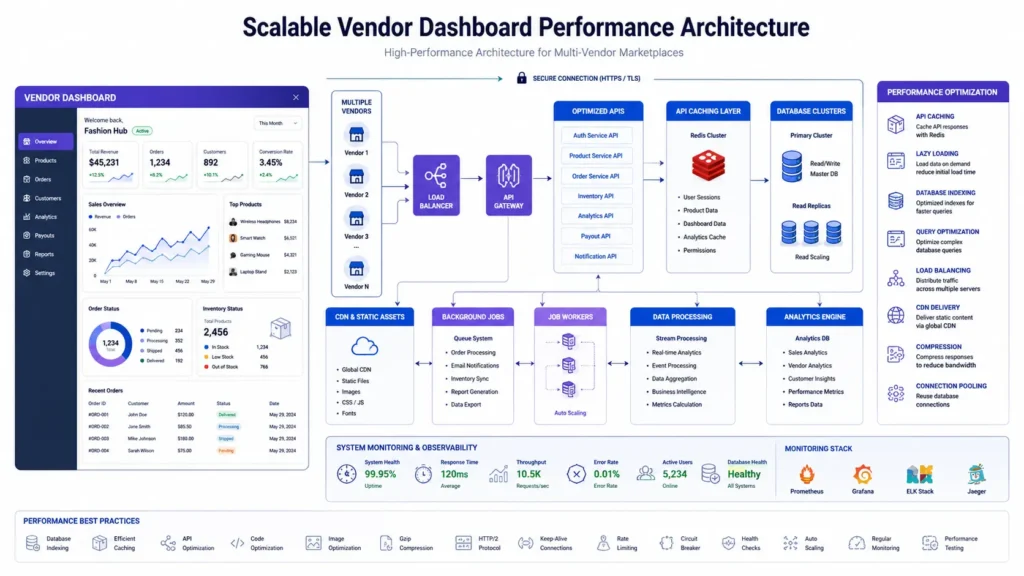
The most common performance bottleneck in vendor dashboard development for marketplaces is unoptimized database queries. As your vendor count grows, queries that were fast with a small dataset become slow and expensive.
Key optimizations include:
– Composite indexes on vendor_id combined with the fields most commonly used in dashboard queries like order status, created_at, and product_id
– Pagination on all list views — never load an entire order history or product catalog in a single query
– Materialized views for complex analytics calculations that do not need to be computed on every dashboard load
– Query result caching for data that changes infrequently like vendor profile information and commission rates
Frontend Performance for Vendor Dashboards
A fast API is only half the equation. Vendor dashboard development for marketplaces also requires a frontend architecture optimized for performance:
– Lazy loading for dashboard sections that are not immediately visible on page load
– Virtual scrolling for long lists of orders and products so the browser only renders what is visible
– Optimistic UI updates that show the result of an action immediately while the API call completes in the background
– Code splitting so vendors only download the JavaScript they need for the section they are viewing
Infrastructure Scaling
When your marketplace runs a major promotion or seasonal sale, vendor dashboard traffic can spike dramatically in a very short time. Your infrastructure needs to handle this without degrading the experience for vendors who are actively fulfilling orders during your highest-revenue periods.
Key infrastructure decisions for vendor dashboard development for marketplaces:
– Horizontal auto-scaling for your API layer so additional instances spin up automatically under load
– CDN delivery for all static dashboard assets to reduce latency for vendors in different geographic locations
– Database read replicas to offload analytics and reporting queries away from your primary transactional database
– Queue-based processing for bulk operations like CSV product imports so they do not block the main API
UX Principles for Vendor Dashboard Development for Marketplaces
Design for the Least Technical Vendor
Your marketplace will have vendors ranging from enterprise operations with dedicated e-commerce teams to individual sellers managing their store from a mobile phone between shifts. Your vendor dashboard UX needs to work well for both.
Design for your least technical vendor. If someone who has never used a dashboard before can figure out how to list a product, update their inventory, and check their payout status without reading a help article, your dashboard is well designed.
This means:
– Progressive disclosure — show vendors the most important information first and reveal advanced features as they need them
– Contextual help tooltips on every non-obvious field or action
– Clear error messages that explain what went wrong and how to fix it
– Empty states that guide new vendors toward their first action rather than showing a blank screen
Mobile-First Vendor Experience
A significant portion of vendors will manage their stores primarily from mobile devices. Vendor dashboard development for marketplaces must prioritize the mobile experience — not as an afterthought, but as the primary design constraint.
Mobile-first vendor dashboard design means:
– Touch-friendly tap targets for all interactive elements
– Simplified navigation that works with one hand on a phone screen
– Critical actions like order confirmation and inventory updates accessible within two taps from the home screen
– Offline capability for reading order details and product information when connectivity is unreliable
Onboarding That Converts Vendors
The vendor onboarding flow is the first experience a new vendor has with your dashboard. A complex, confusing, or slow onboarding flow means vendors abandon the process before they ever list a product.
Effective vendor onboarding in marketplace dashboard development should:
– Break the process into clear, named steps with a visible progress indicator
– Allow vendors to save their progress and resume later without losing data
– Integrate identity verification and payment setup in a single guided flow
– Celebrate completion with a clear confirmation and a direct path to listing their first product
Analytics and Reporting in Vendor Dashboard Development for Marketplaces
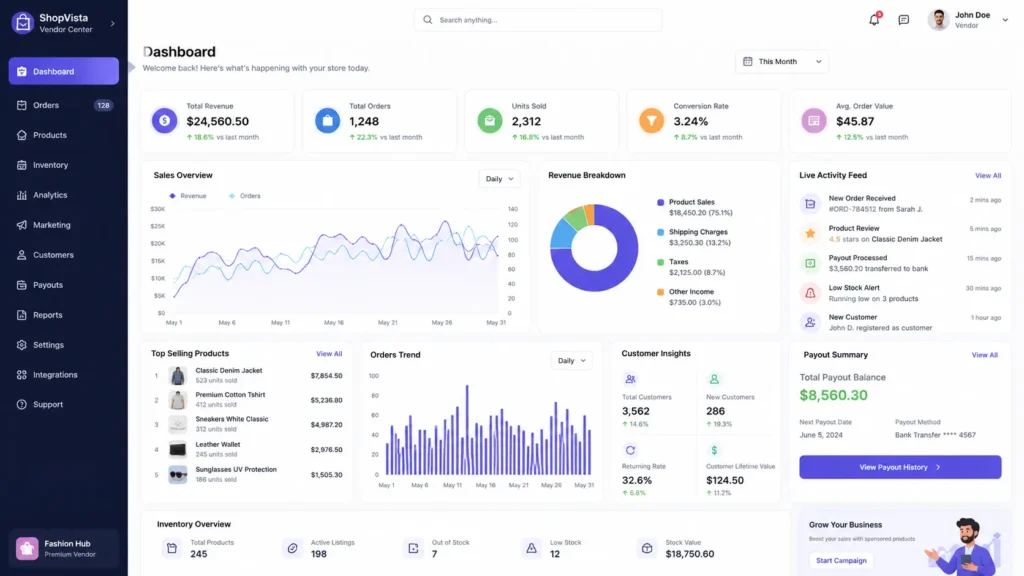
Vendors stay on platforms where they can clearly see that their business is growing. Analytics and reporting are not optional features in vendor dashboard development for marketplaces — they are retention tools.
The analytics your vendor dashboard must provide:
– Revenue over time with configurable date ranges and comparison to previous periods
– Order volume trends broken down by product, category, and customer geography
– Conversion rate data showing how many visitors to a vendor’s storefront complete a purchase
– Inventory turnover rates to help vendors identify slow-moving stock before it becomes a problem
– Payout history with a full transaction ledger, commission breakdown per order, and upcoming payment schedule
For platforms with significant vendor counts, consider giving vendors access to cohort analysis tools that show how their customer retention compares to platform averages. Vendors who can see that their repeat customer rate is below average have a concrete reason to invest in improving their service quality.
For a technical reference on building analytics infrastructure, the Elasticsearch documentation covers the aggregation patterns most commonly used in marketplace analytics.
Common Mistakes in Vendor Dashboard Development for Marketplaces
– Building the vendor dashboard as an afterthought: Treating the vendor dashboard as a secondary priority after the customer storefront is the most expensive mistake in marketplace development. Vendors who find your dashboard frustrating will leave for a competitor before you have time to fix it.
– No data isolation at the database level: Relying on application-layer filtering for vendor data isolation creates security vulnerabilities that compound as your vendor count grows. Enforce isolation at the database level from day one.
– One-size-fits-all payout settings: Forcing all vendors onto the same payout schedule creates friction with your best sellers. Build configurable payout preferences into your vendor dashboard from the beginning.
– Ignoring mobile vendors: A vendor dashboard that only works well on desktop excludes a significant portion of your potential vendor base. Mobile-first is not optional in modern vendor dashboard development for marketplaces.
– No bulk operations support: As vendors grow their catalogs, they need to update hundreds of products at once. A dashboard that only supports one-at-a-time edits will frustrate growing vendors exactly when you want them most engaged.
How MarkupMarvel Approaches Vendor Dashboard Development for Marketplaces
At MarkupMarvel, vendor dashboard development for marketplaces is a core part of our marketplace engineering practice. We build vendor dashboards that are fast, secure, and genuinely intuitive — designed to reduce your support burden while giving vendors the visibility and control they need to grow their business on your platform.
Every vendor dashboard we build starts with data isolation architecture, because security and compliance cannot be retrofitted. We build on API-first foundations so your dashboard scales with your vendor base without requiring architectural rewrites. And we design with your least technical vendor in mind, because a dashboard that works for everyone is a dashboard that retains everyone.
Whether you are building a vendor dashboard from scratch, scaling an existing dashboard that has hit performance limits, or migrating vendors from a legacy system to a modern architecture, we bring the same commitment to structural integrity and long-term maintainability to every engagement.
For a broader look at how vendor dashboards fit into overall marketplace infrastructure, see our guide on multi-vendor marketplace architecture: https://markupmarvel.com/multi-vendor-marketplace-architecture
Frequently Asked Questions
Q: What is the most important feature in a vendor dashboard for a marketplace?
A: Data isolation is the most critical architectural feature — vendors must only ever see their own data. From a UX perspective, real-time order notifications and clear payout tracking are the features vendors use most and value most highly.
Q: How do I handle thousands of vendors using the dashboard simultaneously?
A: The key is layered caching, database query optimization with proper indexing, and horizontal auto-scaling for your API layer. WebSockets for real-time events and read replicas for analytics queries are also essential at scale.
Q: Should I build the vendor dashboard as part of the main platform or as a separate application?
A: A separate application with its own authentication layer and API scope is the better architecture. It enforces data isolation more cleanly, allows independent deployment and scaling, and makes it easier to give vendors a focused experience without exposing them to platform-level admin features.
Q: How long does it take to build a scalable vendor dashboard?
A: A focused MVP with core order management, inventory, and payout visibility typically takes eight to twelve weeks. A full-featured dashboard with advanced analytics, mobile optimization, and bulk operations typically takes sixteen to twenty weeks depending on integration complexity.
Q: Can you help us improve an existing vendor dashboard that vendors are complaining about?
A: Yes. We frequently work with marketplaces that have outgrown their original dashboard architecture. We start with a performance and UX audit to identify the highest-impact improvements, then prioritize fixes based on vendor impact and implementation complexity.
More Blog

High-Availability Cloud Infrastructure: 5 Proven Steps

Nginx Redis Caching Optimization: 6 Proven Speed Tactics

Content Optimization for AI Search: 5 Proven Steps to Rank



