

Server-Side GTM Tracking: 6 Proven Tips for Cleaner Data

Server-Side GTM Tracking: When Businesses Need Cleaner Analytics Data
If you have spent any time comparing your CRM sales records against your Google Analytics reports lately, you have probably noticed something unsettling. The numbers do not match. Sometimes they are off by a little. Often they are off by a lot. Ad blockers, Apple’s Intelligent Tracking Prevention, and the slow death of third-party cookies have quietly broken the tracking setup that most businesses have relied on for the better part of a decade.
This is not a minor inconvenience. When your marketing platforms are working with incomplete data, the algorithms behind Google Ads and Meta start making worse decisions. Your cost per acquisition creeps up. Your return on ad spend looks worse than it actually is. You end up making budget decisions based on numbers that do not reflect what is actually happening with your customers.
Server-side GTM tracking exists to fix exactly this problem. Instead of relying on a browser to faithfully report every interaction back to your analytics tools — something browsers are now actively designed to prevent — you move that responsibility to a server you control. This guide walks through what server-side GTM tracking actually is, why more businesses are adopting it, and how to know if your business has reached the point where it is worth the investment.
What Is Server-Side GTM Tracking?
Server-side GTM tracking moves the execution of your analytics and marketing tags away from the visitor’s browser and onto a secure cloud server that you control. Instead of your website loading a dozen separate third-party scripts that each phone home to a different platform, your site sends one clean stream of data to your own server. That server then processes the data and distributes it to Google Analytics, Meta, and any other platform you use.
The practical effect is significant. Server-side GTM tracking bypasses most ad blockers because the data is leaving from a domain you control rather than a known third-party tracking domain. It improves page load speed because the browser is no longer doing the heavy lifting of compiling and firing off requests to half a dozen different services. And it gives you a genuine first-party data architecture, which matters enormously now that third-party cookies are being phased out across major browsers.
Why Server-Side GTM Tracking Matters for Your Marketing Performance
Restoring Attribution Accuracy
When a browser blocks a tracking pixel, the ad platform on the other end loses the signal it needs to know that a conversion happened. Server-side tracking, particularly when paired with server-to-server connections like the Meta Conversions API, restores that signal. The ad platform’s algorithm gets the data it needs to optimize properly, which directly improves how efficiently your ad spend converts into actual customers.
Faster Page Load Speeds
Every marketing script loaded directly in the browser consumes processing power and network requests. On a mobile device with a weaker connection, this adds up to real, measurable lag. Removing that load from the browser and shifting it to a server has a direct, positive effect on Core Web Vitals — and Core Web Vitals are a known factor in both user experience and search ranking.
Higher Data Accuracy
Because server-side GTM tracking operates through a first-party subdomain that you own — something like data.yourdomain.com — it does not trigger the same browser defenses that block obvious third-party tracking domains. Your analytics end up capturing a far more accurate picture of what users on your site are actually doing.
Better Security and Data Control
Client-side scripts have direct access to everything happening on your page, including form fields. A poorly maintained third-party script is a real security liability. A server-side container acts as a controlled checkpoint — you decide exactly what data leaves your system and what gets stripped out before it ever reaches a third party.
Easier Privacy Compliance
Because your server sits between the raw user data and any outside vendor, you have a single place to enforce privacy rules. Stripping IP addresses, hashing identifiers, or filtering out anything sensitive becomes a configuration decision rather than something you have to trust dozens of individual third-party scripts to handle correctly.
Future-Proofing Your Data Infrastructure
Third-party cookies are going away. Businesses that have already built first-party data pipelines through server-side GTM tracking will not be scrambling when that transition finishes. The ones still relying entirely on client-side scripts will be the ones left with the biggest gaps in their reporting.
Client-Side vs. Server-Side Tracking: What Actually Changes

To understand why this shift matters, it helps to see exactly how the two models differ at a technical level.
In a traditional client-side setup, every vendor tag — your Google Analytics tag, your Facebook pixel, whatever ad platform scripts you have added — runs directly inside the visitor’s browser. Every time something happens on the page, the browser has to build and send a separate network request to each of those individual third-party services. This is resource-intensive on the user’s device, fully visible to anyone inspecting the network tab, and trivially easy for an ad blocker to identify and stop.
Server-side GTM tracking changes this by introducing an intermediate cloud container — typically hosted on Google Cloud Platform or AWS — that runs under your own domain. Your website sends a single, lightweight event to that container. The server then handles all the heavy lifting: sorting the data, stripping anything sensitive, and forwarding clean, properly formatted payloads to Google, Meta, or any other destination through direct API connections that never touch the user’s browser at all.
The Real Cost of Sticking with Client-Side Tracking Alone
Relying purely on browser-based tracking has become a genuine business liability for companies that depend on accurate marketing data. It is common for eCommerce businesses to find a gap of up to roughly 30 percent between actual backend order counts and what client-side analytics tools report.
Apple’s Intelligent Tracking Prevention is a major contributor to this. It aggressively shortens how long client-side cookies survive in Safari. If a customer clicks a paid ad, leaves, and comes back days later to actually complete a purchase, the original tracking cookie may already be gone. Your internal system shows the sale. Your ad platform shows nothing. The algorithm behind your ad account never learns that the ad actually worked, and it keeps optimizing toward the wrong signals.
There is also a security dimension worth taking seriously. Client-side scripts have largely unrestricted access to the page’s Document Object Model. A compromised or poorly maintained third-party library has the technical ability to read active form fields — including payment information — which is a real risk that many businesses are not fully aware they are carrying.
How Server-Side GTM Tracking Restores Signal for eCommerce and SaaS
For any business where revenue depends on accurate attribution, the precision you get from server-side GTM tracking translates directly into better margins.
By combining a lightweight browser-side data layer with server-side tools like the Meta Conversions API and Google Ads’ server-side tracking options, your conversion events travel from your own infrastructure directly to the advertising platform — bypassing the unreliable browser-to-vendor path entirely.
Because this data leaves from behind your own server rather than the user’s browser, you can also safely include hashed identifiers like email addresses or phone numbers to improve match rates without exposing raw personal data. The practical result is that even when a visitor’s browser blocks every client-side script on the page, the backend event still registers correctly, keeping your attribution and your automated ad bidding intact.
Building First-Party Data Ownership in the Post-Cookie Era
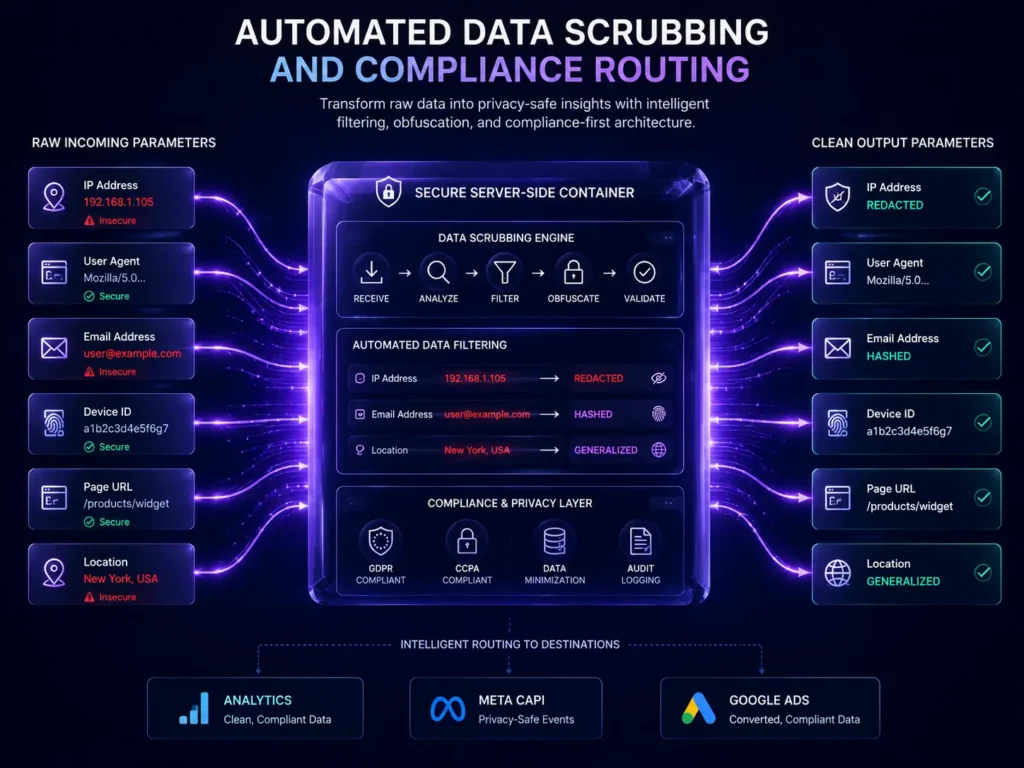
Modern privacy expectations require more than good intentions — they require actual structural control over your data. Server-side GTM tracking gives you exactly that by turning your tracking pipeline into a genuine first-party asset.
Because your tracking requests resolve through a subdomain you control — something like analytics.yourdomain.com — cookies set in the response are treated as first-party by every major browser. That means they survive far longer than third-party cookies do, and your analytics can observe a much more complete picture of long-term user behavior without constantly losing the thread.
Just as importantly, your team gains direct control over what leaves your system. Before any data reaches an outside vendor, your server container can strip IP addresses, remove user-agent strings, or hash identifying information — giving you a concrete, auditable compliance layer rather than hoping a dozen third-party scripts are individually behaving themselves. For the official technical reference on how Google recommends implementing server-side tagging, their developer documentation covers the architecture in detail.
When Should Your Business Migrate to Server-Side GTM Tracking?
Running a server-side container introduces real hosting and maintenance overhead, so it is not something every website needs on day one. These are the situations where the investment clearly pays off:
– Significant paid ad spend: Once monthly ad spend moves past roughly five thousand dollars, the attribution accuracy gains from server-side tracking start to meaningfully affect your cost per acquisition.
– Visible data discrepancies: If you are running an eCommerce platform on Shopify, WooCommerce, or a custom build and consistently see gaps between your order records and your analytics reports, that is a clear signal.
– Core Web Vitals problems caused by tracking scripts: If a performance audit shows that marketing JavaScript is a major contributor to slow load times, moving that load server-side is one of the more direct fixes available.
– Strict regulatory requirements: Businesses operating in healthcare, legal services, or financial services often need the kind of granular data control that only a server-side architecture can reliably provide.
Client-Side vs. Server-Side GTM: A Direct Comparison
Where Processing Happens
Client-side tracking runs entirely inside the user’s browser. Server-side GTM tracking runs inside a private, secure cloud container that you control.
Page Speed Impact
Client-side scripts load multiple external resources directly in the browser, which slows things down. Server-side tracking frees up nearly all of that processing, with minimal impact on page speed.
Tracking Accuracy
Client-side data is frequently degraded by ad blockers and browser privacy features. Server-side tracking operates in a first-party context and maintains significantly higher accuracy.
H3: Data Control
Client-side scripts have open access to the page’s data and limited oversight. Server-side architecture gives your team the ability to audit and control every piece of data before it leaves your system.
Cookie Treatment
Client-side cookies are typically treated as third-party and aggressively restricted by browsers. Server-side cookies set through a first-party subdomain are trusted for much longer periods.
H3: Setup Complexity and Cost
Client-side tracking is a simple copy-paste implementation with no hosting cost. Server-side tracking requires cloud container provisioning and ongoing hosting costs that scale with your traffic volume.
Common Mistakes When Implementing Server-Side GTM Tracking
– Skipping the first-party subdomain setup: Leaving your server endpoint pointed at a generic default URL instead of a proper subdomain like collect.yourdomain.com makes it far easier for tracking prevention tools to identify and block your traffic.
– Forgetting event deduplication: Running both client-side and server-side tracking simultaneously without configuring proper event ID matching causes the same transaction to be counted twice, quietly corrupting your reporting.
– Underestimating ongoing hosting costs: The Google Tag Manager server container software itself is free, but the cloud compute required to run it scales with traffic. Budget for this rather than treating it as a one-time setup cost.
– Trying to fix a broken data layer at the server level: A server-side container can only process the data it receives. If your front-end data layer is sending incorrect values, the server will faithfully forward that bad data downstream.
– Migrating every tag at once: Moving dozens of tracking and retargeting tags to server-side all in one go is a common source of configuration errors. A more reliable approach is to migrate GA4 and your highest-priority conversion APIs first, then expand from there.
How MarkupMarvel Builds Server-Side GTM Tracking Infrastructure
At MarkupMarvel, we treat server-side GTM tracking as a core part of building durable, future-proof analytics infrastructure rather than a one-time technical favor. Every implementation starts with an audit of your existing front-end data layer, because a server-side container can only be as accurate as the data it receives.
From there, we provision and configure the cloud container on a proper first-party subdomain, set up event deduplication to prevent double counting, and connect your priority destinations — GA4, Meta Conversions API, Google Ads — with careful attention to data filtering and privacy compliance. Through our broader Technical SEO & Analytics work, we manage the full transition, including auditing broken front-end elements and configuring the infrastructure inside headless or custom platform architectures.
If your business is also planning a platform move, it is worth handling your analytics migration alongside it rather than separately — our guide on zero-downtime website migration covers how to keep both tracking and search visibility intact during a transition.
Frequently Asked Questions About Server-Side GTM Tracking
Q: What is the core difference between client-side tracking and server-side GTM tracking?
A: Client-side tracking forces the browser to execute and send a separate request for every individual marketing tool on your site. Server-side GTM tracking consolidates this — your site sends one clean data stream to a private server, which then safely formats and forwards that data to each destination through direct API connections.
Q: How much does it cost to run a server-side GTM container?
A: The Google Tag Manager server container software is free. You pay for the cloud hosting it runs on, typically through Google Cloud Platform or AWS. For most mid-sized businesses, that hosting cost runs somewhere between twenty and fifty dollars a month, scaling with your traffic.
Q: Do we still need Google Analytics if we set up server-side tracking?
A: Yes. Server-side GTM tracking is purely a transport layer that processes and routes data correctly. You still need GA4 or another analytics platform to actually read, visualize, and report on that data once it arrives.
Q: Will moving to server-side tracking actually improve our page speed?
A: Yes, often noticeably. Removing heavy marketing JavaScript from the browser frees up processing power on the visitor’s device, which has a direct positive effect on load time and Core Web Vitals scores.
Q: Does server-side tracking completely replace client-side scripts?
A: Not entirely. The most reliable setups use a hybrid approach — a lightweight client-side data layer captures the initial user interaction, and that data is then handed off to the server-side container for processing and distribution.
Q: Why does server-side tracking make GDPR compliance easier?
A: Because all data passes through your own server before reaching any external vendor, you have one centralized place to strip IP addresses, filter sensitive fields, and enforce consent rules — rather than relying on dozens of individual third-party scripts to each handle compliance correctly on their own.
Final Thoughts
The businesses seeing the cleanest, most reliable marketing data right now are not the ones with bigger ad budgets. They are the ones who stopped relying entirely on the user’s browser to faithfully report what happened on their site. Server-side GTM tracking is the structural fix for a problem that ad blockers, browser privacy features, and cookie restrictions have made unavoidable.
If your reporting has started feeling unreliable, or your ad platforms seem to be optimizing toward the wrong signals, that is usually not a campaign problem. It is a data pipeline problem, and it has a known, well-tested technical solution.
More Blog

High-Availability Cloud Infrastructure: 5 Proven Steps

Nginx Redis Caching Optimization: 6 Proven Speed Tactics

Content Optimization for AI Search: 5 Proven Steps to Rank



