
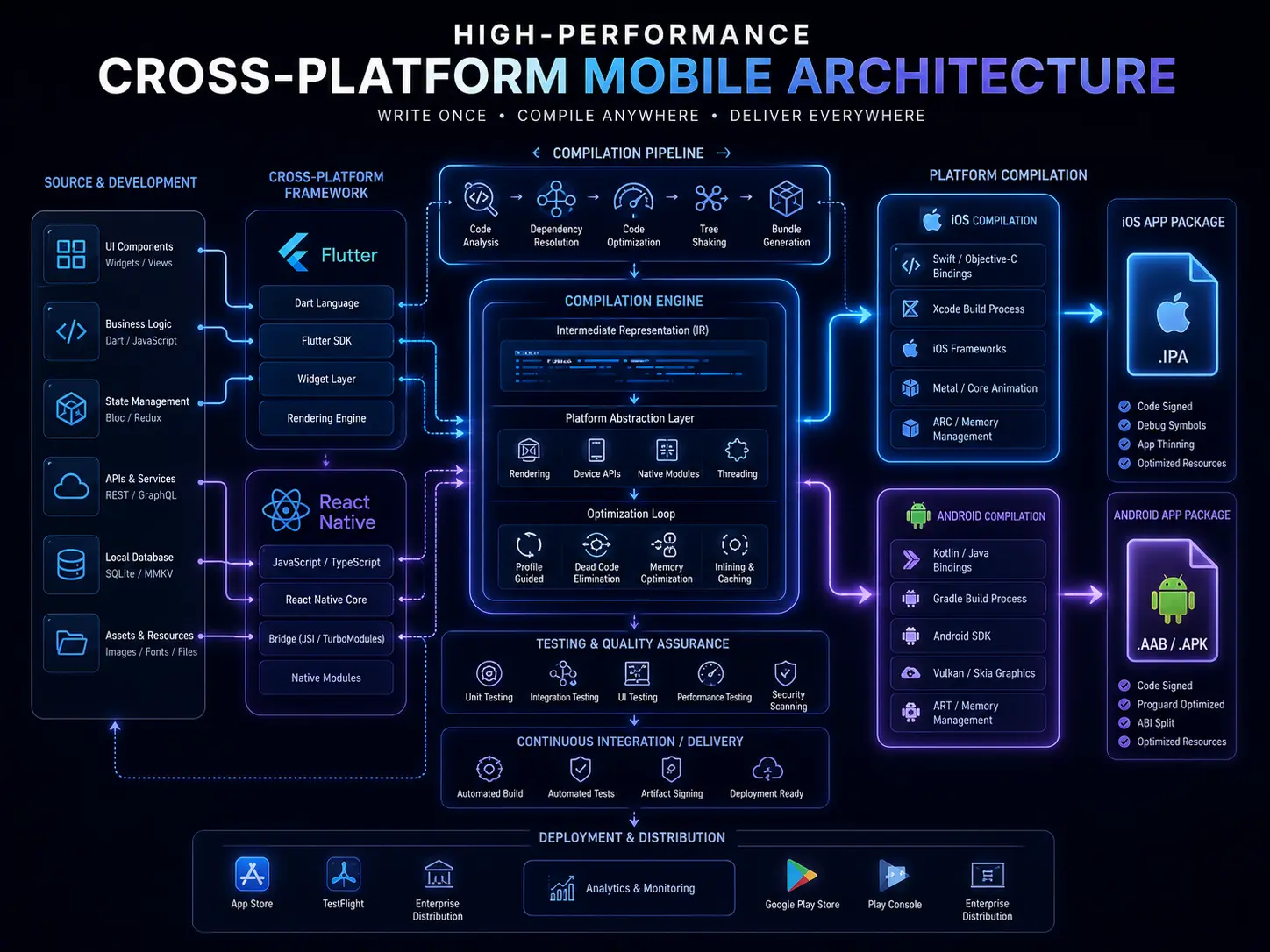
Mobile App Performance Optimization: 7 Proven Strategies

Mobile App Performance Optimization: 7 Proven Strategies
Key Takeaways: Quick Summary for Mobile Product Owners
State Optimization: Replacing global state variables with localized component states and Finite State Machines (FSM) eliminates redundant re-renders and keeps your UI fast and predictable.
Power Management: Reduce device battery drain by batching network requests together and using system-native background job scheduling APIs instead of running continuous background processes.
Perceived Performance: Skeleton loaders and optimistic UI rendering make your app feel faster by masking API response delays, even before the actual data arrives.
Fluid Target: Your CI/CD pipeline should monitor frame rendering times continuously, keeping them below 16ms to maintain smooth 60 to 120fps performance for end users.
Introduction: The High Stakes of App Performance
In today’s competitive digital landscape, mobile app performance optimization is not just a technical checkbox — it is a direct business necessity. Users have zero tolerance for slow interfaces, unexpected battery drain, or long loading times. When an application starts to feel sluggish, the cost is immediate and measurable: higher churn rates, negative App Store reviews, and a direct hit to your monthly revenue.
For agencies, SaaS founders, and product owners, achieving meaningful mobile app performance optimization requires a strategic approach that balances clean technical execution with real user expectations. Whether you are building a complex enterprise platform or a consumer-facing product, the relationship between state management, power consumption, and UI design defines whether your app becomes a daily habit or ends up deleted after the first frustrating session.
According to Google’s mobile performance research, a one-second delay in mobile load time can reduce conversions by up to 20%. That figure alone should make performance optimization a standing item on every product team’s roadmap, not just an afterthought after launch.
This guide walks you through 7 proven strategies for mobile app performance optimization — covering state management architecture, battery-aware development practices, UX rendering techniques, and continuous monitoring workflows that keep your application running at its best as your user base scales.
Quick Answer: What Is Mobile App Performance Optimization?
Mobile app performance optimization is the practice of streamlining code, managing data flow efficiently, and minimizing hardware resource usage to create a faster and more reliable user experience. It involves implementing efficient state management (such as Finite State Machines) to prevent unnecessary re-renders, optimizing background tasks to preserve battery life, and prioritizing UI responsiveness through techniques like skeleton screens and optimistic rendering. These actions directly increase user retention, reduce bounce rates, and improve overall app stability, ensuring your platform scales effectively as your user base grows.
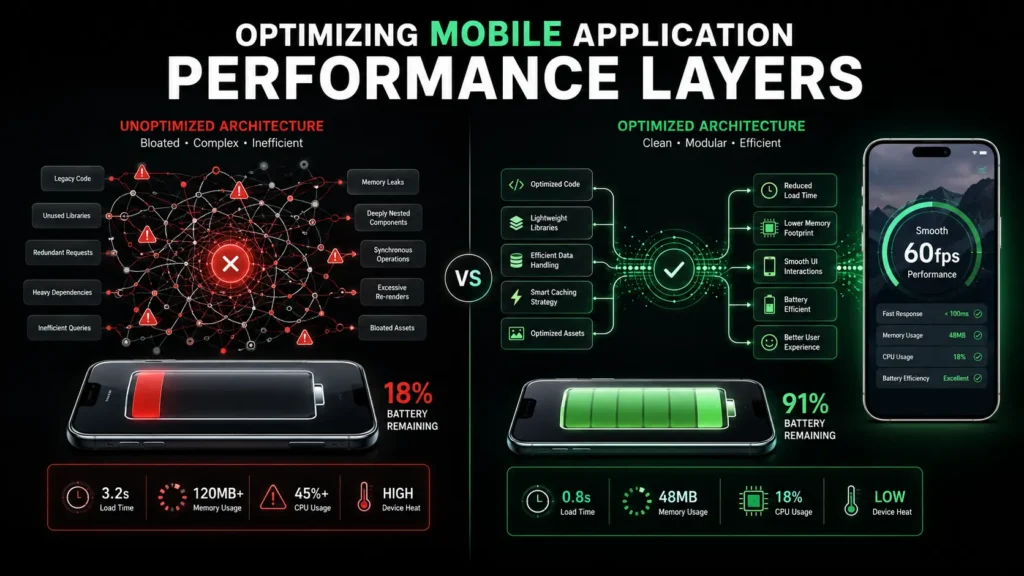
1. Why Mobile App Performance Optimization Directly Impacts Business Growth
Performance is not just about faster code — it is about protecting and growing your business. Here is why treating mobile app performance optimization as a strategic priority pays off across every dimension of your product.
Cost Impact: Efficient resource usage means lower cloud infrastructure costs and less load on your backend servers. An application that makes 40 unnecessary API calls per session costs you money at scale in ways that are easy to overlook during early development.
Scalability: Well-structured state architectures prevent technical debt from building up, allowing your engineering team to add new features without breaking existing functionality. Poor performance choices made at the MVP stage compound quickly as your product grows.
SEO and Visibility Impact: Core Web Vitals metrics for mobile directly influence your search visibility and App Store discovery rankings. A slow, resource-heavy application gets penalized by both Google Search and app marketplace algorithms, reducing your organic reach.
User Retention: Research consistently shows that a meaningful drop in UI responsiveness leads to measurable increases in user churn. Smooth, fast interfaces are one of the primary drivers of long-term user loyalty — more impactful than most feature additions.
Risk Reduction: Optimizing for battery usage and memory management prevents common crashes and operating system throttling events, ensuring your app remains stable and usable even on lower-end or older devices that represent a large portion of the global mobile market.
2. Understanding the Performance Triangle
Think of your mobile application as a triangle with three sides. If any one side — State Management, Battery Efficiency, or User Experience — is neglected, the entire structure becomes unstable and visible to your users as a poor product experience.
State Management (The App’s Brain): This controls how data updates travel through your application and trigger UI changes. When state is managed poorly, even a small data change can cause your entire interface to re-render unnecessarily, creating noticeable lag and wasted CPU cycles.
Battery Efficiency (Hardware Preservation): Every unnecessary background loop, constant location sync, or uncompressed asset download puts additional strain on the device hardware. Operating systems on both iOS and Android actively monitor apps that drain battery excessively and can throttle or flag them, damaging your app store ratings.
User Experience (Perceived Responsiveness): This is the bridge between what is technically happening and what the user actually feels. High-performing apps use smart loading patterns and smooth micro-interactions to make the experience feel instant, even when backend processes are still running.
Effective mobile app performance optimization requires all three sides of this triangle to be addressed simultaneously. Fixing only one or two creates an imbalance that users will still notice.
3. Strategy 1 and 2: Advanced State Management and Battery-Aware Development
Strategy 1: Advanced State Management
One of the most impactful areas of mobile app performance optimization is how your application manages and distributes state. A common and costly mistake is routing all application data through a single global state object, causing every component in the tree to re-render whenever anything changes — even data that is completely unrelated to that component.
Use Local State Where Possible: Keep temporary, short-lived data — such as form input values, dropdown open or closed status, or toggle states — localized to the individual component that uses it. This prevents unnecessary updates from cascading through unrelated parts of your UI.
Implement Finite State Machines (FSM): Tools like XState (https://xstate.js.org) bring a structured, explicit approach to managing complex UI states such as loading, error, success, and empty. Rather than scattering conditional logic across multiple components, FSM defines every possible state and the transitions between them in one place, making your code dramatically easier to debug and maintain.
Memoize Expensive Computations: Use memoization techniques — such as React’s useMemo and useCallback hooks, or Flutter’s const constructors — to prevent expensive calculations from running on every render cycle. Only recompute values when their dependencies actually change.
Strategy 2: Battery-Aware Development
Battery drain is one of the most common reasons users uninstall applications. Effective mobile app performance optimization must include deliberate strategies for reducing the power footprint of your app’s background activity.
Lazy Load Assets and Code: Only load assets, images, and code modules when they are actually required on screen. Eager loading everything on app startup wastes both memory and battery on content the user may never reach in that session.
Batch Network Requests: Instead of firing individual API calls for each data element, group related requests together and send them as a single batched operation. This reduces the number of times the device radio hardware needs to activate, which is one of the largest contributors to battery drain in data-heavy applications.
Use System-Native Background Scheduling: Both iOS and Android provide background job scheduling APIs — WorkManager on Android and BGTaskScheduler on iOS — that allow you to defer non-urgent background work to times when the device is charging or connected to Wi-Fi, dramatically reducing active battery impact.
4. Strategy 3 and 4: UX-Driven Performance Design and Continuous Monitoring
Strategy 3: UX-Driven Performance Design
In mobile app performance optimization, the user’s perception of speed is just as important as the actual technical performance numbers. Two techniques stand out as particularly effective at improving perceived responsiveness without requiring backend changes.
Skeleton Screens: Replace generic loading spinners with skeleton screens — placeholder layouts that mirror the structure of the content about to load. Users perceive skeleton-loaded interfaces as significantly faster than spinner-based ones because the app appears to already know what is coming, even before the data arrives.
Optimistic UI Rendering: Update the interface immediately after a user action — such as liking a post, adding an item to a cart, or submitting a comment — without waiting for the server response to confirm success. The actual API call happens in the background, and only if it fails does the UI roll back. This technique eliminates perceived network latency for the vast majority of interactions where the server call succeeds.
Strategy 4: Continuous Performance Monitoring
Mobile app performance optimization is not a one-time project — it is an ongoing discipline that must be woven into your development workflow. Every new feature, third-party library update, or backend change is an opportunity for a performance regression to creep in unnoticed.
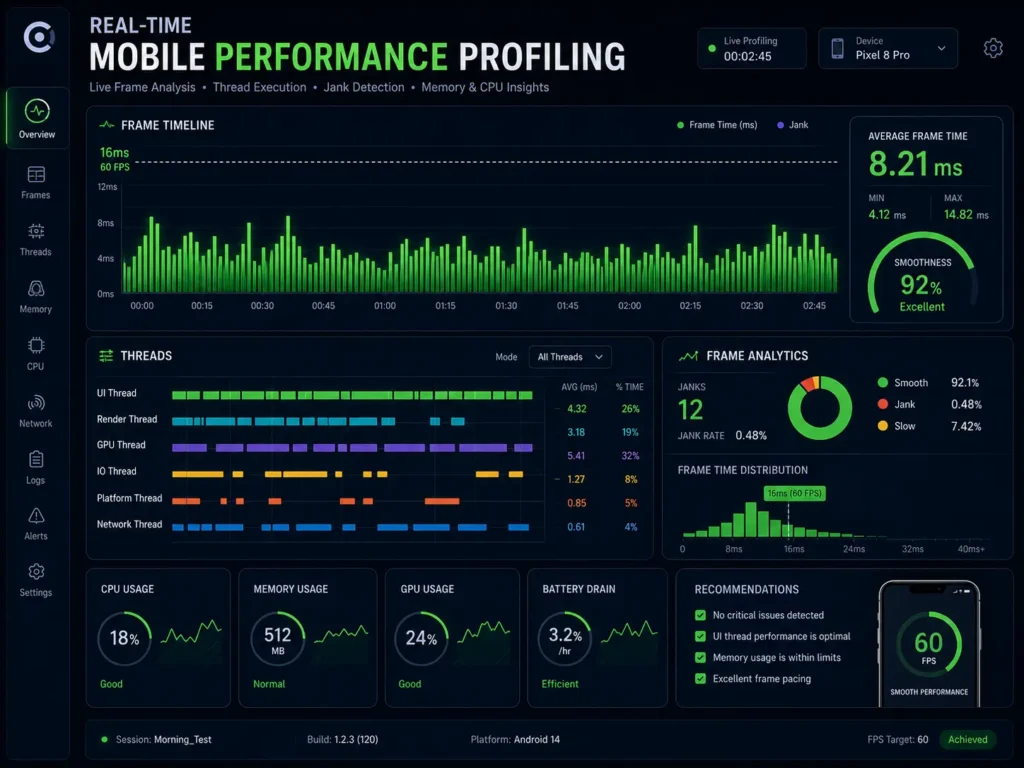
Integrate profiling tools directly into your development process. Flutter DevTools provides detailed widget rebuild tracking and frame timing analysis. React Profiler in React Native gives you component render counts and timing data that makes it easy to identify which parts of your UI are rendering more frequently than necessary.
Set 16ms as your frame rendering target. At 60 frames per second, each frame has exactly 16.67 milliseconds to complete. Any frame that takes longer causes a visible stutter that users will feel, even if they cannot articulate exactly what feels wrong about the experience.
5. Mobile App Performance Optimization Comparison Table
The table below compares common under-optimized approaches against their optimized counterparts, along with the direct business benefit each improvement delivers.
Metric | Sub-Optimal Approach | Optimized Approach | Business Benefit
State Handling | Global state for all data | Local state and FSM | Faster UI, fewer crashes
Network Calls | Frequent small API requests | Batched and queued requests | Lower server cost, better battery life
UX Feel | Generic loading spinner | Skeleton screens and optimistic UI | Higher user engagement and retention
Rendering | Full-page re-renders on every update | Memoization and selective updates | Consistent 60fps smoothness
Assets | Uncompressed high-resolution images | WebP or AVIF with caching policies | Faster load times, less data usage
Background Tasks | Always-on background processes | System-native scheduled jobs | Reduced battery drain and OS throttling
6. Common Mobile App Performance Mistakes to Avoid
Even experienced engineering teams fall into predictable traps when it comes to mobile app performance optimization. Recognizing these patterns early is far cheaper than fixing them after they reach production.
Over-Rendering Components: Triggering application-wide re-renders when only a single isolated data element changes is one of the most common and damaging performance mistakes. Always scope state changes to the smallest possible part of your component tree.
Ignoring Memory Leaks: Failing to properly clean up event listeners, timers, animation loops, or data stream subscriptions when a component is removed from the screen causes memory usage to grow continuously over the course of a user session, eventually leading to crashes or severe slowdowns.
Loading Unoptimized Media Assets: Sending large, uncompressed images to mobile devices is one of the fastest ways to slow down your app and frustrate users on slower connections. Convert all images to WebP or AVIF format and enforce proper caching headers to prevent redundant downloads.
Running Heavy Operations on the Main Thread: Parsing large data sets, reading local files, or performing complex calculations directly on the main UI thread blocks user interaction and causes the app to feel frozen. Offload intensive work to background threads — Isolates in Flutter or Web Workers in React Native environments.
Pro Tip: Always test your mobile app performance optimization results across a range of low-end and mid-range devices, not just the latest flagship hardware. The majority of your real-world user base is on devices that are two to four years old, and performance issues that are invisible on a high-end device will be immediately apparent on entry-level hardware.
Skipping Automated Performance Testing: Manual performance testing is inconsistent and time-consuming. Integrating automated performance profiling directly into your CI/CD pipeline catches regressions before they reach users, rather than after.
7. Frequently Asked Questions
Q: Does state management affect battery life?
A: Yes, directly. When a poorly configured state setup triggers unnecessary re-renders across your entire component tree, CPU usage spikes with each update cycle. Higher CPU activity means more power draw, which translates directly into faster battery drain and a worse user experience, particularly during extended usage sessions.
Q: What is optimistic UI and why does it improve performance?
A: Optimistic UI is a design strategy where the interface reflects a successful action immediately after the user triggers it, before the server has confirmed the result. For example, when a user taps a like button, the count increments instantly on screen while the API call happens in the background. This eliminates the perceived wait time for the vast majority of actions that succeed, making your app feel dramatically more responsive.
Q: When should performance optimization take priority over new features?
A: Mobile app performance optimization should be treated as a continuous requirement running parallel to feature development, not a separate phase. If user retention is declining, crash rates are increasing, or your engineering team is finding it increasingly difficult to ship features without breaking existing functionality, a focused performance and architecture review should move to the top of your roadmap immediately.
Q: How does battery efficiency affect app store rankings?
A: While battery drain is not a direct ranking signal in app store algorithms, operating systems monitor apps that consistently consume excessive power and flag them to users. Apps that drain battery quickly accumulate negative reviews mentioning battery usage, which directly impacts your overall rating and reduces organic installs over time. Effective mobile app performance optimization protects your app store reputation as much as it protects the user experience.
Q: Is mobile app performance optimization a one-time task?
A: No. Every new feature, dependency update, or backend change introduces the potential for performance regressions. Mobile app performance optimization must be an ongoing discipline embedded in your development culture, supported by automated profiling in your CI/CD pipeline and regular performance review sessions as part of your sprint cycle.
8. Conclusion: Engineering an Ultra-Responsive Mobile Ecosystem
Effective mobile app performance optimization is the difference between an application users recommend and one they abandon. The seven strategies covered in this guide — from smart state management and battery-aware development to skeleton screens, continuous profiling, and automated testing — work together as a system, not as isolated fixes. Implementing all of them creates a compounding improvement in speed, stability, and user satisfaction that directly translates to better retention and stronger business outcomes.
At MarkupMarvel, we eliminate system bottlenecks by designing robust, high-efficiency digital products built for real-world performance at scale. Transforming a sluggish mobile experience into a high-performance asset requires deep expertise in reactive programming, memory management, and modern rendering architecture.
Through our specialized Mobile App Development and MERN Stack and SaaS Development programs, our engineers rebuild complex application backends to guarantee seamless scalability. We optimize your entire technical roadmap — from configuring scalable state architectures to deploying automated performance monitoring natively inside your CI/CD pipeline. Learn more about our engineering services at MarkupMarvel.com.
Secure Superior Application Performance Today
Do not allow interface lag, battery drain complaints, and performance regressions to compromise your product’s growth. Partner with our senior mobile app performance optimization consultants to engineer a fast, stable, and scalable mobile architecture built for maximum user retention and long-term business growth.
More Blog

High-Availability Cloud Infrastructure: 5 Proven Steps

Nginx Redis Caching Optimization: 6 Proven Speed Tactics

Content Optimization for AI Search: 5 Proven Steps to Rank



