
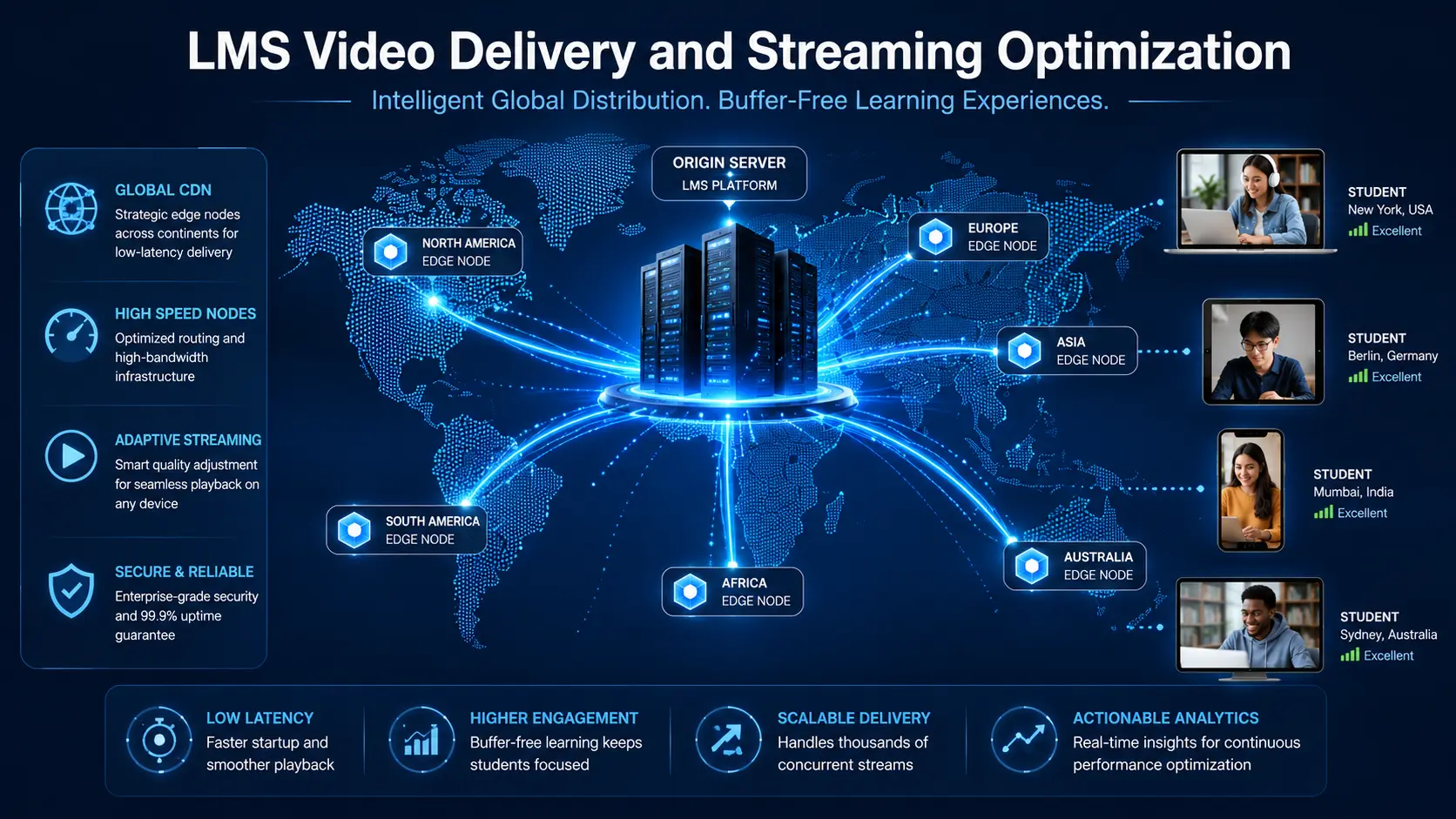
LMS Video Delivery: Stream Courses Faster Worldwide 2026

Video Delivery for LMS Platforms: How to Stream Courses Faster Worldwide
LMS video delivery is the single biggest technical factor that determines whether students stay engaged or give up on your course platform entirely. You can have the best curriculum in your niche, a beautiful interface, and a perfectly structured learning path — and still lose students at the moment they press play, if your video infrastructure is not built to handle real-world conditions.
Buffering is not a minor inconvenience in e-learning. It is a trust problem. When a student experiences lag or playback failure in the middle of a lesson, they do not assume it is a temporary glitch. They assume the platform is unreliable. That assumption affects whether they come back tomorrow, whether they finish the course, and whether they recommend it to anyone else.
The good news is that the technical solutions are well-established and accessible to platforms of any size. This guide walks through exactly how modern LMS video delivery works, what separates fast platforms from slow ones, and the specific infrastructure decisions that make the difference.
Short Answer
Optimizing LMS video delivery requires moving beyond simple file hosting. To ensure fast, buffer-free streaming worldwide, platforms must use a Content Delivery Network (CDN), implement adaptive bitrate streaming via HLS or DASH, and choose specialized video hosting providers over local server hosting. By offloading video traffic and automatically adjusting quality based on each viewer’s connection speed, you reduce server strain, eliminate playback interruptions, and significantly improve both student engagement and course completion rates.
Why LMS Video Delivery Directly Affects Your Revenue
Most platform owners think of video performance as a technical concern. It is actually a business concern that shows up directly in conversion rates, completion rates, and long-term student retention.
Prospective learners judge platform quality within the first few seconds of pressing play. A video that loads instantly and plays smoothly signals a professional, trustworthy product. A video that buffers or stalls signals the opposite — regardless of how good the content itself is.
For students who have already purchased, playback quality determines whether they complete lessons. Research consistently shows that completion rates drop sharply when video performance degrades. Students who do not finish courses do not leave positive reviews, do not purchase follow-up courses, and do not refer others. The compounding effect on lifetime customer value is significant.
From a technical standpoint, serving video directly from your LMS server creates a different kind of problem. As traffic grows, video files compete with your database, plugins, and website assets for the same server resources. The result is slower page loads across your entire platform — not just the video player.
Investing in proper LMS video delivery infrastructure is not a luxury for large platforms. It is the foundation that makes growth sustainable.
How LMS Video Delivery Actually Works
Understanding the architecture helps you make better decisions about where to invest and what to prioritize.
When a student presses play, a request goes out to wherever your video file is stored. If that file lives on your main web server, the server has to handle both the video stream and everything else simultaneously — database queries, plugin requests, page loads for other users. That is a significant bottleneck that gets worse as your student base grows.
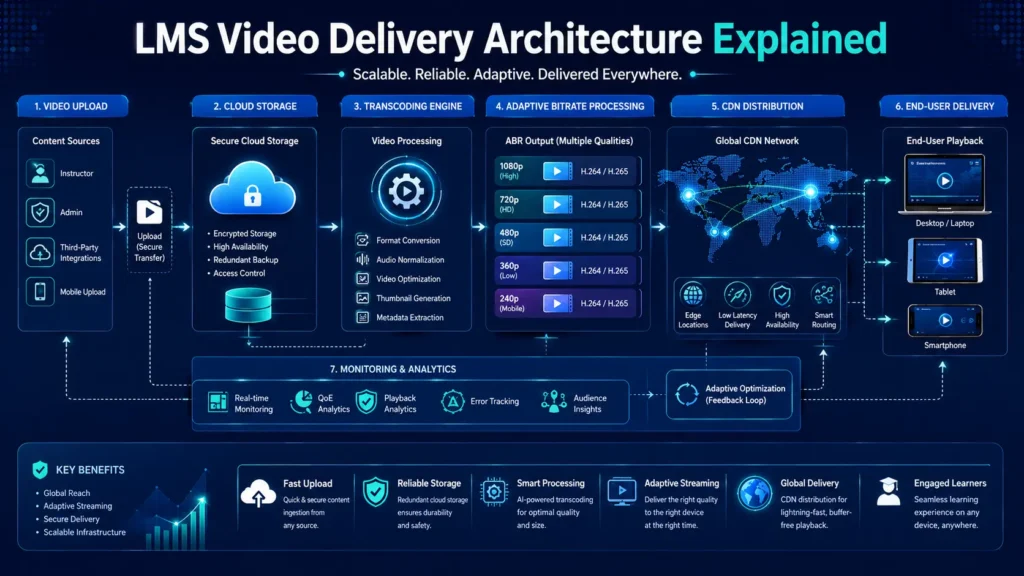
Modern LMS video delivery separates video storage and delivery from everything else. Video files are uploaded to dedicated storage, processed through a transcoding engine that creates multiple quality versions, and then distributed across a global CDN. When a student in Tokyo presses play, the content comes from a nearby edge server — not from a data center on the other side of the world.
This architecture is what makes fast, reliable global streaming possible. It is not a single technology — it is a combination of storage, transcoding, distribution, and playback working together.
What Adaptive Bitrate Streaming Does
Adaptive bitrate streaming is the technology that makes video playback feel smooth regardless of the viewer’s internet connection.
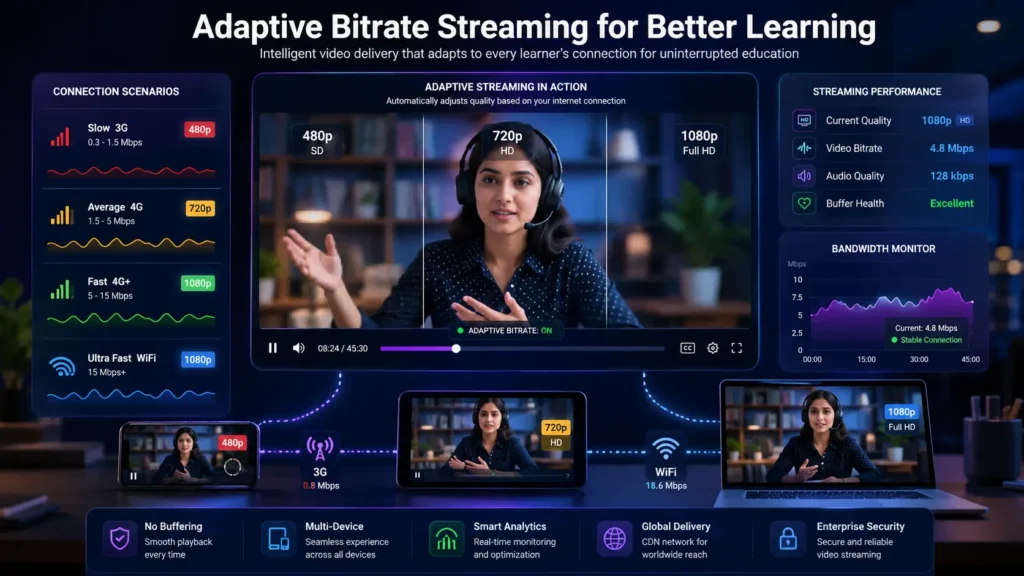
Instead of sending one fixed-quality video file to every student, adaptive bitrate streaming breaks content into small chunks at multiple quality levels. The video player monitors the viewer’s available bandwidth in real time and automatically switches between quality levels as conditions change.
In practice, this means a student on a slow mobile connection receives a 480p stream that plays without buffering. A student on a fast broadband connection receives 1080p. If a student’s connection drops mid-lesson, the player steps down to a lower quality rather than pausing entirely. When the connection improves, quality steps back up — all without any action required from the student.
The two main standards for adaptive bitrate streaming are HLS (HTTP Live Streaming, developed by Apple) and DASH (Dynamic Adaptive Streaming over HTTP). Both are widely supported across browsers and devices. HLS tends to have slightly better compatibility with iOS devices, while DASH offers more flexibility for DRM (Digital Rights Management) implementations.
For most LMS platforms, HLS is the practical default. Any professional video hosting provider will handle the transcoding and adaptive delivery automatically — you upload once and the platform manages the rest.
4 Strategies to Optimize Your LMS Video Infrastructure
1. Use a Global Content Delivery Network
A CDN stores copies of your video assets on servers distributed around the world. When a student accesses your course, the content is delivered from the nearest edge location rather than your origin server.
The difference in performance is not marginal. A student in London accessing content from a European edge server will experience dramatically faster start times and lower latency than if the same content were served from a data center in the United States. For a global student base, CDN delivery is not optional — it is the baseline requirement for acceptable performance.
Beyond speed, CDNs also provide resilience. If one edge location experiences issues, traffic is automatically routed to the next nearest node. This means your platform stays up and your students keep learning even during infrastructure problems that would take down a single-server setup.
2. Use Professional Video Hosting APIs
Professional streaming platforms handle transcoding, delivery, analytics, and scalability automatically. You upload the source file once, and the platform creates all the quality variants, manages the CDN distribution, and provides a secure embeddable player.
Well-regarded options in this space include Mux, Cloudflare Stream, and AWS Elemental Media Services. Each has different pricing models and feature sets, but all three eliminate the need to manage video infrastructure yourself.
For most LMS platforms, the cost of professional video hosting is significantly lower than the operational cost of managing equivalent infrastructure independently — and the reliability is higher.
3. Implement Secure Encrypted Streaming
Course videos are intellectual property, and unprotected video URLs are trivially easy to share outside your platform. Secure streaming protects your content and ensures that only paying students can access it.
HLS encryption with AES-128 encrypts each video chunk before delivery, so even if someone intercepts the stream, the content is unreadable without the decryption key. Signed URLs add a second layer of protection by generating time-limited access links that expire after a set period. Together, these two mechanisms make unauthorized sharing and downloading significantly more difficult.
For platforms with high-value content, DRM (Digital Rights Management) through Widevine or FairPlay provides the strongest available protection, though it adds implementation complexity.
4. Optimize for Mobile-First Learning
A growing majority of e-learning consumption happens on mobile devices, and mobile networks are inherently more variable than fixed broadband. Your video delivery strategy needs to account for this.
Adaptive bitrate streaming handles the connection variability. But there are additional considerations: touch-friendly player controls, fast startup times even on slower connections, and cross-browser compatibility across the full range of mobile browsers. Testing your video player on actual mobile devices — not just browser developer tools — is the only reliable way to catch the issues that affect real students.
Self-Hosting vs. Professional CDN Delivery
Feature | Self-Hosted Video | Managed CDN / Video API
———————–|————————-|————————-
Server Load | Extremely High | Extremely Low
Buffering Risk | High | Minimal
Security | Low | High
Scalability | Limited | Virtually Unlimited
Cost Predictability | Poor | Excellent
Transcoding | Manual / Complex | Automatic
Global Performance | Poor | Excellent
For any platform beyond the earliest prototype stage, managed CDN delivery is the correct choice. The operational overhead of self-hosted video — bandwidth costs, transcoding management, security configuration, and the ongoing maintenance burden — consistently outweighs the apparent simplicity of keeping everything on one server.
Common LMS Video Delivery Mistakes
Hosting Videos on Your Main Server
This is the most common mistake and the one with the broadest consequences. Large video files competing for server resources slow down your entire platform, not just the video player. Students experience slow page loads, delayed lesson navigation, and poor playback — and they attribute all of it to platform quality.
Skipping Video Transcoding
Uploading raw high-resolution source files and serving them directly wastes enormous amounts of bandwidth and creates terrible playback experiences for students on slower connections. Every video should be transcoded into multiple quality levels before delivery. Professional hosting platforms handle this automatically.
Weak Security Controls
Public video URLs that do not expire and are not access-controlled can be shared freely outside your platform. If your course content is accessible to anyone with a link, your intellectual property is exposed and your paying students are subsidizing free access for everyone else.
Neglecting Mobile Users
Mobile compatibility issues are one of the most common sources of negative reviews on LMS platforms. If your video player does not work well on iOS Safari or Android Chrome, you are delivering a poor experience to a large and growing segment of your student base.
Using Generic Public Video Embeds
Hosting paid course content on public platforms like YouTube or Vimeo’s free tier means your students may see ads, competitor recommendations, or suggested content that pulls them away from your platform. Professional video hosting keeps the viewing experience fully within your control.
For platforms that also manage product catalogs or e-commerce alongside course delivery, see our guide on e-commerce product feed optimization: /ecommerce-product-feed-optimization
Frequently Asked Questions
Q: Does hosting video on my own server hurt SEO?
A: Yes, indirectly. Large video files increase server load and slow down page performance, which negatively affects Core Web Vitals scores. Google uses Core Web Vitals as a ranking signal, so poor video hosting can reduce your organic search visibility over time.
Q: What is adaptive bitrate streaming?
A: Adaptive bitrate streaming is a technology that automatically adjusts video quality based on the viewer’s available internet speed. Instead of sending one fixed-quality file, the system delivers the best possible quality the viewer’s connection can handle — reducing buffering without sacrificing quality for students on fast connections.
Q: Should I use YouTube for paid course videos?
A: Generally no. YouTube is a public platform that displays ads, shows suggested content from other creators, and does not offer the access controls or branding options that a professional LMS requires. Dedicated video hosting solutions give you full control over the viewing experience and protect your content from unauthorized access.
Q: How do I prevent course videos from being downloaded?
A: Use HLS encryption with AES-128 to encrypt video chunks during delivery, combined with signed URLs that expire after a set period. For higher-value content, DRM solutions like Widevine (for Android and Chrome) and FairPlay (for Apple devices) provide the strongest available protection.
Q: How does a CDN improve LMS performance?
A: A CDN delivers video content from servers located physically close to each student, rather than from a single origin server. This reduces the distance data has to travel, which directly reduces latency and improves playback start times. For a global student base, CDN delivery is the most impactful single infrastructure change you can make.
Q: What video hosting platform should I use for my LMS?
A: Mux, Cloudflare Stream, and AWS Elemental Media Services are all strong options for professional LMS video delivery. The right choice depends on your budget, technical requirements, and expected video volume. All three handle transcoding, CDN delivery, and secure playback automatically.
Q: At what point should I move away from self-hosted video?
A: The moment your platform has paying students, self-hosted video is a risk. The performance problems become more visible as traffic grows, and the cost of fixing them after launch is higher than building the right infrastructure from the start. If you are launching a new platform, start with professional video hosting from day one.
The Bottom Line
Fast, reliable LMS video delivery is not a technical detail — it is the core experience your students pay for. Every buffering event, every playback failure, and every slow load time is a moment where a student’s confidence in your platform erodes a little further.
The infrastructure to solve this is well-established and accessible. CDN delivery, adaptive bitrate streaming, secure hosting, and professional video APIs are not enterprise-only tools anymore. They are available to platforms of any size, and the cost of not using them — in student churn, lower completion rates, and missed referrals — consistently exceeds the cost of implementation.
If your platform is still serving video from your main web server, this is the highest-leverage infrastructure change available to you right now.
Ready to Build a Faster LMS?
We build high-performance LMS and e-learning platforms with proper video delivery architecture, CDN integration, and the technical foundations that scale.
More Blog

High-Availability Cloud Infrastructure: 5 Proven Steps

Nginx Redis Caching Optimization: 6 Proven Speed Tactics

Content Optimization for AI Search: 5 Proven Steps to Rank



