
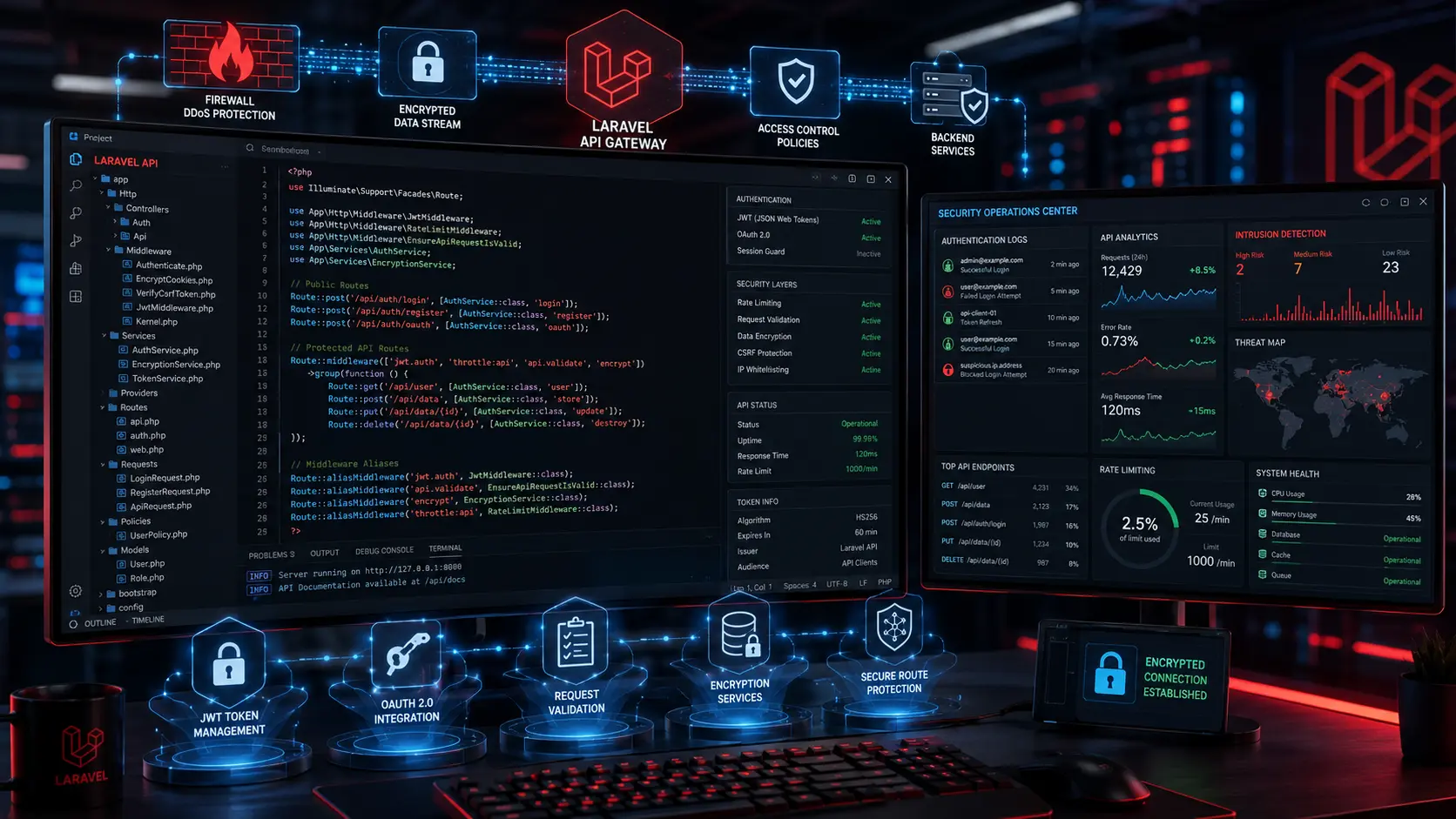
Laravel API Security Best Practices | Developer Guide

Laravel API Security Best Practices for Modern Web Applications
Key Takeaways: Quick Summary for Technical Leaders
- Authentication Standard: Choose Laravel Sanctum for lightweight token management or Passport for heavy OAuth2 integration; always avoid permanent tokens.
- Access Control: Centralize validation logic through Laravel Policies and Gates to stop Broken Access Control (OWASP #1).
- Traffic Shielding: Implement aggressive global and endpoint-specific rate limiting to halt brute-force and DDoS attempts before they strain server resources.
Production Rule Zero: Never deploy with APP_DEBUG=true. Restrict server-level access to the .env file and automate dependency tracking using composer audit
Introduction: The Central Nervous System under Attack
For modern digital platforms, APIs are the central nervous system. They power your headless frontend, mobile applications, third-party integrations, and SaaS architectures. However, an exposed or improperly configured backend represents a massive operational liability.When organizations rapidly scale their web applications, security configurations often lag behind feature development. A single compromised token, an overlooked authorization check, or an exposed .env file can result in catastrophic data leaks, regulatory fines, and irreparable damage to brand trust. As cyber threats evolve—with automated bots scanning for vulnerabilities like exposed endpoints and supply chain weaknesses—relying on default framework settings is no longer enough.
Business leaders, CTOs, and engineering teams must adopt a proactive security posture. Building a secure Laravel API requires strategic architectural decisions, rigorous middleware implementation, and strict data validation at every layer of the application stack.
Short Answer: What are the best practices for Laravel API security?
To secure a Laravel API, you must implement robust token-based authentication using Laravel Sanctum or Passport, enforce strict rate limiting to prevent brute-force attacks, and apply rigorous middleware access controls. All incoming payloads must be validated and sanitized using Form Requests to prevent SQL injection and cross-site scripting. Additionally, secure your environment by keeping dependencies updated via composer audit, strictly disabling debug mode in production, and properly configuring CORS policies to protect business-critical data from unauthorized access.
1. Why API Security Infrastructure Impacts Business Longevity
Treating API security as an afterthought is a costly mistake. From an engineering and business perspective, implementing robust security protocols directly impacts your bottom line and operational stability.
- Risk Reduction and Compliance: If your business handles sensitive user data, payment information, or healthcare records, you are subject to frameworks like GDPR, HIPAA, or SOC 2. Secure API architecture is a foundational requirement for passing compliance audits and avoiding severe legal penalties.
- Cost Impact of Breaches: Data breaches halt business operations, incur massive technical recovery costs, and frequently lead to customer churn. Proactive security measures are a fraction of the cost of post-breach remediation.
- Scalability and Performance: Well-structured security protocols, such as efficient rate limiting and query caching, do not just protect your application; they prevent server overload and ensure smooth performance during high-traffic events.
- Long-Term Maintainability: A secure API follows strict architectural patterns. This standardized approach makes it significantly easier for engineering teams to maintain, audit, and scale the application over time without introducing technical debt.
- SEO and Brand Authority Impact: Security and uptime are critical for search and AI engine discovery systems. If an API vulnerability causes application downtime or malware injection, search platforms will quickly penalize your platform, destroying organic traffic.
2. Understanding Laravel API Security Architecture
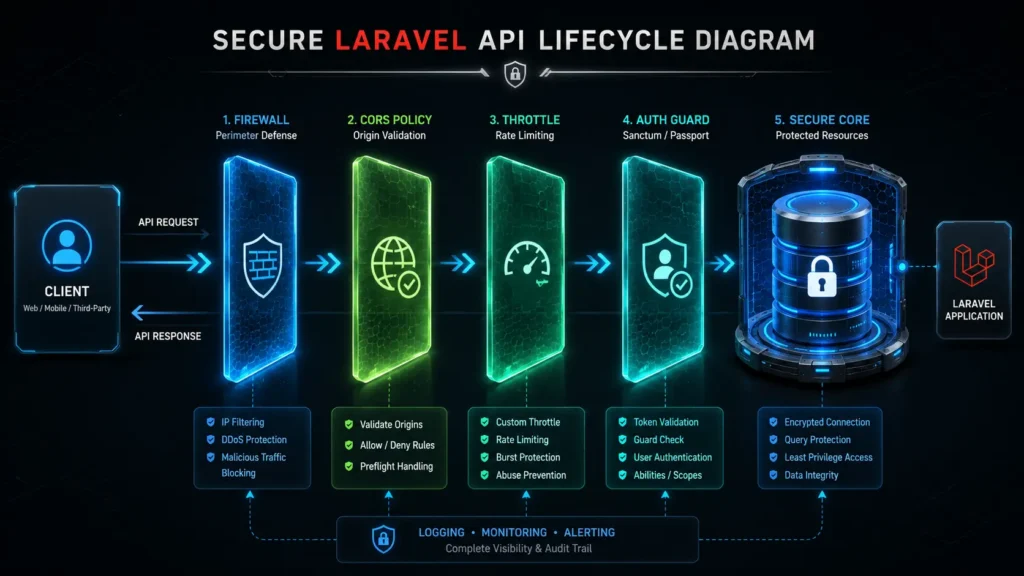
Before diving into specific tactics, it is crucial to understand how Laravel handles API requests from an architectural standpoint. When a client (a mobile app, browser, or external service) sends a request to your API, the request does not immediately hit your database. Instead, a well-architected Laravel application routes the request through a series of security checkpoints.
First, the web server handles the initial SSL/TLS encryption. The request then enters the Laravel application lifecycle, where it passes through CORS (Cross-Origin Resource Sharing) checks to ensure the request originates from a permitted domain. Next, the request hits Middleware—a series of filters that can throttle traffic, verify authentication tokens, and check authorization policies. Only after passing these rigorous checks does the request reach the Controller, where data is validated against strict rules before interacting with the Eloquent ORM and the database.
By fortifying each of these layers, you create a defense-in-depth strategy that prevents attackers from exploiting a single point of failure.
3. Strategic Breakdown: Core API Security Practices
1. Robust Authentication and Token Management
Weak API authentication is one of the most common vulnerabilities in modern web applications. Laravel provides built-in, robust solutions for managing API access, but they must be configured correctly:
- Sanctum vs. Passport: Choose the right tool for your specific use case. Use Laravel Sanctum for Single Page Applications (SPAs), mobile applications, and simple token-based APIs. It is lightweight and highly secure. If your application requires a full OAuth2 server implementation—where third-party applications request limited access to your users’ accounts—use Laravel Passport.
- Short-Lived Tokens: Never issue permanent API tokens. Configure token expiration times to limit the window of opportunity if a token is intercepted. Ensure your mobile and frontend applications are built to handle token refresh gracefully.
- Server-Side Token Validation: Never rely exclusively on client-side logic (like checking LocalStorage) to determine authentication status. Every sensitive API route must be protected by the auth:sanctum or auth:api middleware to enforce server-side validation on every single request.
2. Enforcing Strict Access Control and Authorization
Authentication verifies who the user is; authorization verifies what they are allowed to do. Broken Access Control consistently ranks as the top vulnerability on the OWASP Top 10 list.
- Implement Laravel Policies and Gates: Do not hardcode authorization logic into your controllers. Define precise access rules using Laravel Policies—for example, ensuring that User A cannot request, edit, or delete the billing information of User B.
- Route Grouping and Middleware: Group your protected routes and apply middleware universally. This prevents developers from accidentally exposing a new endpoint by forgetting to attach an authentication guard.
3. Rate Limiting and Throttling
APIs are highly susceptible to brute-force attacks, credential stuffing, and Distributed Denial of Service (DDoS) attacks. Laravel’s built-in rate limiting is a critical defense mechanism.
- Configuring the Throttle Middleware: Apply the throttle middleware to your API routes. For example, throttle:60,1 limits a user or IP to 60 requests per minute.
- Dynamic Rate Limiting: For SaaS applications, you can assign dynamic rate limits based on user roles or subscription tiers. An authenticated premium user might be allowed 500 requests per minute, while an unauthenticated guest is limited to 10.
- Protecting Authentication Endpoints: Apply ultra-strict rate limiting specifically to login, password reset, and registration routes to immediately block brute-force scripts.
4. Input Validation and Data Sanitization
Never trust incoming client data. Malicious payloads can lead to SQL injection, Cross-Site Scripting (XSS), or mass assignment vulnerabilities.
- Mandatory Form Requests: Avoid using $request->all() in your controllers, which blindly accepts any data sent by the client. Instead, use Laravel Form Request classes to validate every incoming field against strict criteria (e.g., ensuring an email is actually an email format, or an ID exists in the database).
- Mass Assignment Protection: Protect your Eloquent models by defining exactly which fields can be written to the database using the $fillable array. This prevents attackers from injecting unexpected parameters, such as changing their role_id to ‘admin’ during a standard profile update.
- Safe Database Queries: Stick to Laravel’s Eloquent ORM or the Query Builder. These tools automatically use PDO parameter binding, effectively neutralizing SQL injection attacks. Avoid raw SQL queries (DB::raw()) unless absolutely necessary, and if used, ensure all inputs are rigorously sanitized.
5. Managing the Software Supply Chain
Modern applications rely heavily on open-source packages. Supply chain vulnerabilities occur when a compromised dependency is pulled into your project.
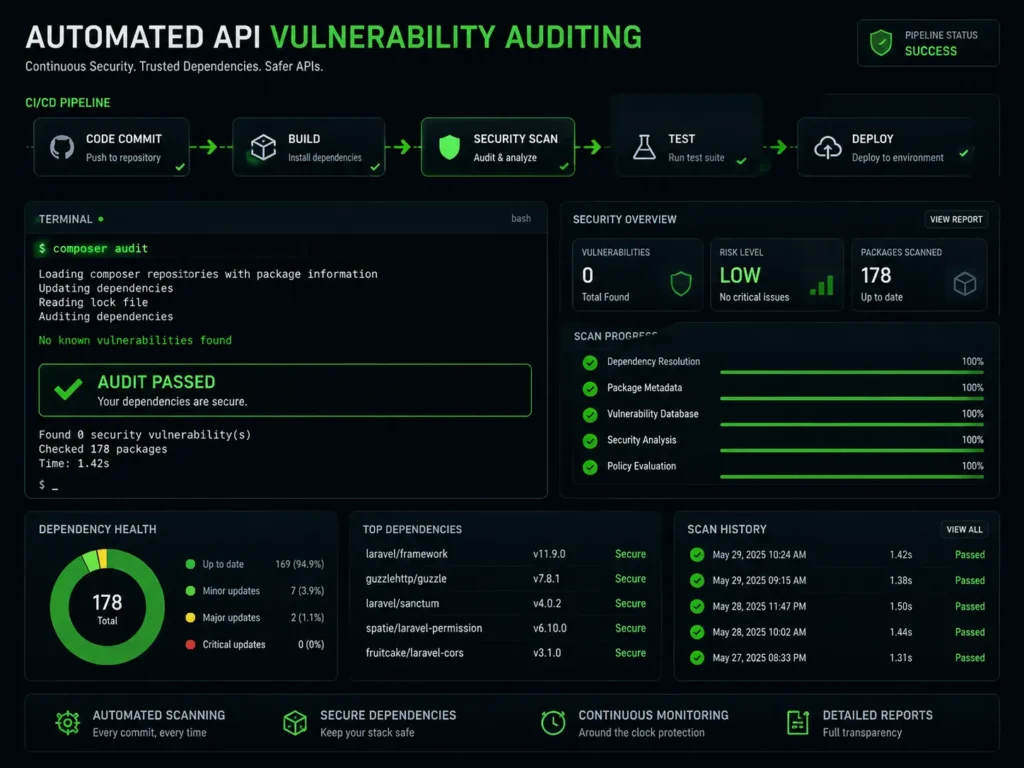
- Dependency Auditing: Integrate composer audit and npm audit into your CI/CD pipeline. These commands automatically check your dependency tree against known vulnerability databases and will fail the build if a compromised package is detected.
- Version Pinning: Pin critical dependencies to specific versions rather than using wildcards, ensuring that an unexpected, potentially compromised update does not break your production environment.
6. Environment and State Protection
Misconfigurations in production environments frequently lead to catastrophic data leaks.
- Disable Debug Mode: Never run your application with APP_DEBUG=true in a production environment. If an error occurs, debug mode will expose stack traces, database credentials, and sensitive environment variables directly to the user. Always set APP_DEBUG=false and log errors to a secure monitoring service.
- Protect the .env File: Your .env file contains the keys to your kingdom. Ensure your web server configuration restricts all public access to this file.
Enforce HTTPS: Ensure all data transmitted between the client and the API is encrypted. Force HTTPS at the application layer by updating the AppServiceProvider and configuring your load balancers and web servers to reject insecure HTTP connections.
4. The Essential Laravel API Security Checklist
| Security Layer | Implementation Action | Priority |
| Authentication | Implement Sanctum/Passport and enforce token expiration policies. | High |
| Authorization | Define and attach Laravel Policies for all resource manipulation routes. | High |
| Environment | Verify APP_DEBUG=false and restrict .env file access. | Critical |
| Traffic Control | Apply throttle middleware globally and strictly on login routes. | High |
| Data Integrity | Replace $request->all() with validated Form Requests. | Critical |
| Model Security | Define $fillable properties on all Eloquent models. | High |
| Network | Enforce HTTPS and configure strict CORS policies. | High |
| Supply Chain | Run composer audit and automate checks in CI/CD. | Medium |
| Logging | Implement whitelist logging to prevent storing sensitive credentials. | Medium |
5. Common Mistakes to Avoid in Production Deployments
Even experienced teams can miss critical details when deploying APIs. Avoid these common engineering pitfalls:
- Exposing Raw Eloquent Models: Returning $user->all() directly from an API endpoint often leaks sensitive data like hashed passwords or internal system IDs. Always use Laravel API Resources to strictly control which fields are returned to the client.
- Hardcoding API Keys: Storing third-party API keys or secrets directly in your version-controlled source code allows anyone with repository access to exploit them. Always use environment variables (.env) for secrets.
- Ignoring CORS Misconfigurations: Setting your CORS policy to allow all origins (Access-Control-Allow-Origin: *) on authenticated routes leaves your API vulnerable to malicious exploitation and data theft. Always whitelist specific, trusted domains.
Pro Tip: Never use wildcard operators on protected business API logic layers. Explicit origin domain mapping is required to maintain zero-trust perimeter criteria across modern cloud arrays.
- Skipping Rate Limits on Public Routes: Developers often remember to rate-limit login endpoints but forget public search or filtering endpoints. Attackers can spam these heavy database queries to exhaust server resources and trigger a denial of service condition.
- Relying on Client-Side Validation: Form validation on the frontend improves user experience, but it provides zero security. Attackers bypass the frontend entirely by sending payloads directly via tools like Postman. You must enforce validation server-side.
- Missing Exception Handling Customization: Default error handlers might return raw HTML pages or internal stack traces to an API client expecting clean JSON. Configure your Exception Handler to always return standardized JSON error payloads without leaking internal backend configurations.
6. Frequently Asked Questions
Q: Why is API security important for my business?
A: API security protects your business-critical data, prevents costly data breaches, ensures compliance with regulations like GDPR or SOC 2, and maintains system uptime. A compromised API can lead to severe financial loss and permanent damage to brand reputation.
Q: Should I use Laravel Sanctum or Passport for my API?
A: Use Laravel Sanctum for Single Page Applications (SPAs), mobile apps, and standard token-based APIs; it is lightweight and highly secure. Use Laravel Passport only if your application requires a full OAuth2 server, allowing third-party apps to access user data on their behalf.
Q: How does rate limiting protect a Laravel API?
A: Rate limiting restricts the number of requests a single IP address or user can make within a specific timeframe. This prevents automated scripts from executing brute-force attacks on login forms and protects your server from being overwhelmed by destructive automated script traffic.
Q: What is the danger of leaving APP_DEBUG set to true?
A: Leaving APP_DEBUG=true in a production environment exposes detailed error messages, framework stack traces, database credentials, and internal environment structures to the public whenever an error occurs. This gives malicious actors the exact roadmap needed to exploit your layout.
Q: How do Form Requests improve Laravel security?
A: Form Requests enforce strict server-side validation rules on incoming data before it reaches your core application logic. This ensures that invalid formats, malicious payloads, or unexpected parameters are rejected immediately, protecting your database layer.
Q: Can MarkupMarvel audit my existing Laravel API for security flaws?
A: Yes, absolutely. Our senior engineering team performs deep technical audits of production architectures to locate configuration oversights, harden authentication infrastructure, and introduce elite architectural practices ensuring comprehensive database isolation.
7. Conclusion: Securing Your Digital Assets
At MarkupMarvel, we establish strict defensive protocols directly into the foundation of your digital ecosystem. Securing a modern web application framework requires absolute structural consistency, expert implementation handling, and a clear understanding of runtime vulnerabilities.
Through our Laravel Engineering specialization platform, our engineers configure enterprise-grade systems capable of withstanding heavy technical stress while keeping proprietary company data locked down. Whether setting up complex custom access layers or configuring defensive web patterns under Managed Hosting & Server environments, we ensure your framework is secure, compliant, and lightning fast.
From initial design parameters up to full AI Integration & Automation deployments, our code structures bypass fragile workarounds in favor of production-hardened engineering logic. If you require advanced Technical SEO & Analytics Setup services mapped over robustly secure endpoints, we engineer systems that drive growth safely.
Fortify Your Technical Ecosystem
Do not wait for a structural vulnerability or malicious bot network to expose your backend system architecture. Upgrade your platform with optimized access routines built entirely for security compliance and high-performance scalability.
Suggested Schema Types:
- Article / BlogPosting (Main schema for the post)
- FAQPage (For the FAQ section to capture rich snippets)
- TechArticle (Highlighting technical proficiency and software engineering practices)
- Organization (MarkupMarvel entity relationship)
More Blog

High-Availability Cloud Infrastructure: 5 Proven Steps

Nginx Redis Caching Optimization: 6 Proven Speed Tactics

Content Optimization for AI Search: 5 Proven Steps to Rank



