
Headless WordPress with Next.js: 7 Proven Strategies

Headless WordPress with Next.js and WPGraphQL: Complete Business Guide
Key Takeaways: Quick Summary for Digital Directors
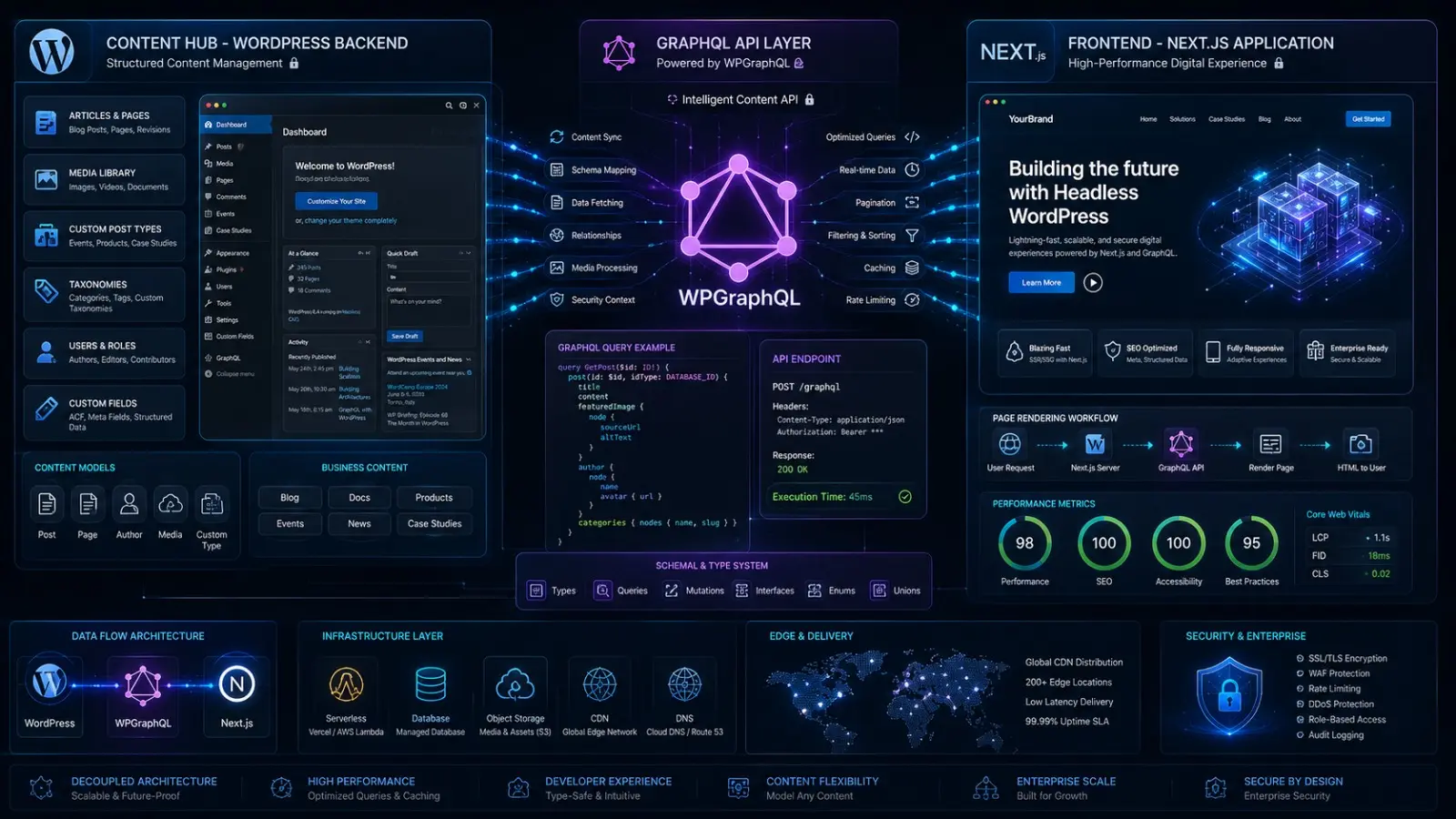
The Structural Blueprint: Decoupling separates your WordPress admin environment (the backend content engine) from your public-facing user experience layer built with high-performance Next.js.
The API Messenger: WPGraphQL replaces legacy REST API protocols, preventing data over-fetching by letting Next.js request exactly the fields it needs in a single efficient request.
Uptime Security: By hiding your WordPress admin login page on a private server subdomain, you eliminate the most common attack surface for automated bots and plugin exploits entirely.
Operational Autonomy: Content editors keep full access to the familiar Gutenberg block editor, while frontend developers gain complete freedom to build modern React components at full speed.
Introduction: Breaking the Monolithic Paradigm
If your digital platform is struggling with slow page loads, frequent security vulnerabilities, or server crashes during high-traffic events, traditional monolithic web architecture is likely the root cause. For growing businesses, SaaS companies, and enterprise publishers, relying on a standard WordPress setup often means sacrificing front-end performance for back-end editorial convenience — a trade-off that becomes increasingly costly as your audience scales.
The solution lies in decoupling the two layers entirely. Adopting Headless WordPress with Next.js changes the paradigm completely. By separating the content management system from the front-end user experience, organizations can achieve app-like page speeds, significantly stronger security, and perfect Core Web Vitals scores — all without forcing their marketing teams to abandon the WordPress editorial interface they already know and rely on every day.
According to the WP Engine Headless WordPress Report, over 60% of enterprise organizations are actively evaluating or already running headless CMS architectures.
Quick Answer: What Is Headless WordPress with Next.js and WPGraphQL?
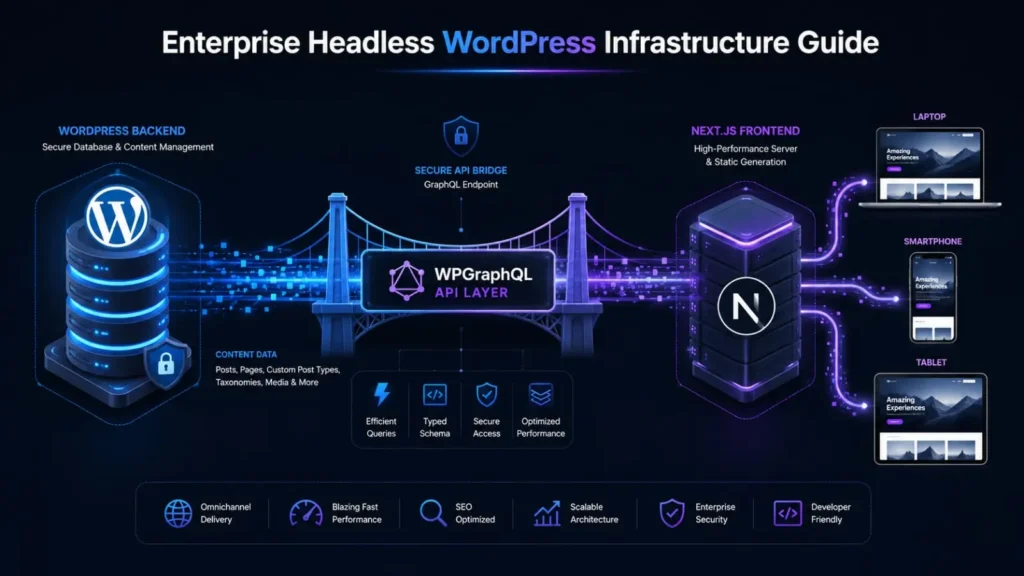
Headless WordPress with Next.js and WPGraphQL is a modern web architecture that separates the WordPress backend (used for content management) from the frontend (built with Next.js for the user experience). WPGraphQL acts as the API bridge connecting the two layers. This setup delivers enterprise-grade performance, stronger security, and multi-platform scalability while allowing marketing teams to keep the familiar WordPress editorial interface completely intact.
1. Why Headless WordPress with Next.js Impacts Business Growth
Transitioning to Headless WordPress with Next.js is a major strategic decision. From both an engineering and business growth perspective, the impact of decoupling your platform extends far beyond simple page speed improvements.
Cost Impact: While initial development investment is higher, headless architecture significantly reduces long-term server costs. Because the frontend is served as pre-built static files via a Content Delivery Network (CDN), you dramatically reduce database queries and server load, lowering hosting expenses as your traffic scales.
Scalability: When traffic spikes occur during a product launch or viral marketing campaign, a traditional WordPress site often crashes under database overload. Headless WordPress with Next.js scales horizontally and absorbs massive traffic instantly without affecting the backend editorial environment at all.
SEO Impact: Search engines prioritize speed, stability, and security. Next.js delivers pre-rendered pages that load in milliseconds, consistently achieving high scores across Google’s Core Web Vitals — a direct ranking factor that influences your organic search visibility.
User Experience: By using a modern React framework like Next.js, the user experience becomes dynamic and app-like. Page transitions feel instantaneous, reducing bounce rates and keeping users engaged for longer sessions.
Conversion Impact: Every second of load time costs conversions. By eliminating rendering delays and optimizing the delivery path, e-commerce brands and B2B SaaS companies see measurable improvements in lead generation and checkout completion rates.
Maintenance Impact: Decoupling means front-end redesigns no longer require touching the backend database or content structures. You can completely overhaul your site’s design without any risk to your existing content.
Risk Reduction: Removing the direct connection between your public-facing website and your WordPress database dramatically reduces the attack surface for hackers, neutralizing the most common WordPress plugin and theme vulnerabilities.
Long-Term Growth: A headless setup future-proofs your digital presence. As new devices and channels emerge — IoT displays, mobile apps, partner portals — your content is already structured as accessible data that can be delivered anywhere.
2. The Three Architectural Pillars of Headless WordPress with Next.js
To understand why Headless WordPress with Next.js has become the preferred architecture for modern enterprise builds, you need to understand the three distinct layers of this stack: WordPress, WPGraphQL, and Next.js.
The Monolithic Bottleneck
In a traditional WordPress setup, the backend where you write content and the frontend that users see are tightly coupled together. When a visitor loads a page, the server runs PHP scripts, queries the MySQL database, assembles the HTML with theme files, and sends the full response to the browser. This process is resource-intensive, slow under load, and creates a direct security connection between your public website and your database.
The Next.js Advantage
Next.js is a production-grade React framework built for modern web performance. Instead of building pages in the browser on each visit (Client-Side Rendering) or rebuilding them on the server for every request (Server-Side Rendering), Next.js excels at Static Site Generation (SSG). It pre-builds your web pages into static HTML files during the deployment process.
Next.js also supports Incremental Static Regeneration (ISR), which allows individual pages to update in the background when content changes.
The WPGraphQL Bridge
If WordPress holds the content and Next.js displays it, how do the two layers communicate? That is exactly what WPGraphQL solves. Traditional WordPress REST API responses send large blocks of data regardless of what the page actually needs, which wastes bandwidth and slows delivery.
3. Strategic Benefits: What Headless WordPress with Next.js Delivers
Unmatched Performance and Core Web Vitals
Performance is the primary driver for adopting Headless WordPress with Next.js. Because Next.js serves pre-rendered HTML via global edge networks, Time to First Byte (TTFB) and First Contentful Paint (FCP) drop to milliseconds. There is no waiting for database queries to run on each page load. This architecture consistently achieves strong scores across all Core Web Vitals, which signals to search engines and AI answer engines that your site provides a high-quality user experience worth ranking.
Enhanced Security
WordPress powers over 40% of the web, making it a frequent target for automated bot attacks, SQL injection attempts, and brute-force login attempts. In a headless setup, your WordPress backend is completely hidden from the public internet. It lives on a private subdomain or behind a firewall, accessible only to your editorial team. Because the Next.js frontend has no direct database connection, the traditional attack paths through WordPress plugins and themes are completely closed off.
Multi-Platform Content Distribution
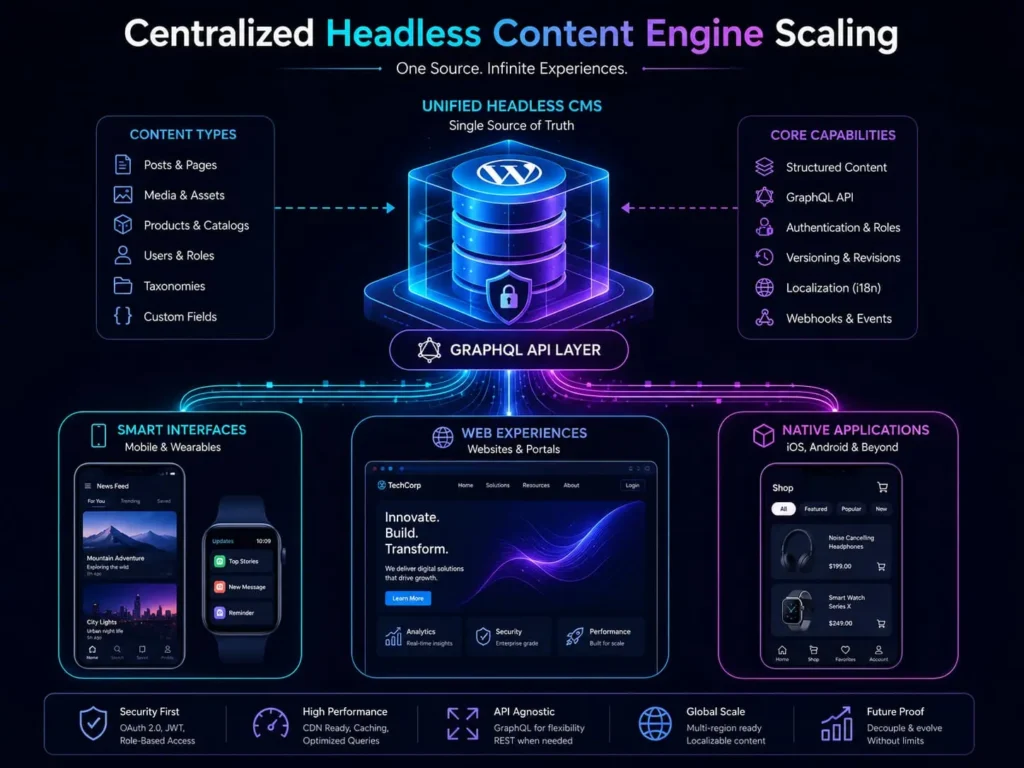
Modern brands publish content across websites, mobile apps, smart displays, and partner portals simultaneously. By using WPGraphQL, your WordPress installation becomes a centralized content hub. Content is structured as reusable data rather than fixed web pages. You write an article once in WordPress, and WPGraphQL distributes that content to your Next.js website, your Flutter mobile app, and your customer dashboard — all in a single publish action.
Developer Speed and Flexibility
Traditional WordPress forces developers to work within PHP templates and legacy theme structures, which slows down development cycles and limits what is possible on the frontend. Shifting to Next.js gives your engineering team access to the full modern React ecosystem. They can build reusable components, use modern styling libraries, and work with clean, predictable data from GraphQL. This improves shipping speed and reduces the number of bugs introduced during development.
4. Is Headless WordPress with Next.js Right for Your Business?
Headless WordPress with Next.js is a powerful architecture, but it is not the right fit for every project. It requires a higher initial investment and a team comfortable with modern JavaScript and React development.
Choose Headless WordPress with Next.js If:
You manage a high-traffic publishing platform, enterprise SaaS site, or multi-brand digital presence. Your site consistently struggles with performance issues that server-level caching cannot fully resolve. Database security, compliance, and isolating your content infrastructure from public access are top priorities. You want to build a highly customized, interactive web application using modern frontend components.
Stick With Traditional WordPress If:
You are running a simple, low-traffic brochure website with straightforward content needs. Your current development budget does not support the higher initial build investment. Your workflow depends heavily on visual page builder plugins that inject frontend scripts directly into the template layer.
5. Monolithic WordPress vs Headless WordPress with Next.js
Feature | Monolithic WordPress | Headless WordPress with Next.js
—|—|—
Rendering Strategy | Server-side PHP with live database queries | Pre-rendered static HTML via SSG and ISR
Performance | Slower; depends on aggressive server caching | Very fast; files served directly from edge CDN
Security | Frontend directly connected to the database | Backend fully isolated; frontend is a static asset
Scalability | Vertical (requires upgrading server hardware) | Horizontal (scales infinitely via CDN)
Plugin Ecosystem | Heavy reliance on frontend template plugins | Plugins handle backend data only
Best Suited For | Small to mid-sized marketing sites | Enterprises, SaaS platforms, high-traffic portals
6. Common Mistakes to Avoid When Going Headless
When migrating to Headless WordPress with Next.js, engineering and marketing teams frequently run into the same preventable problems. Here is what to watch out for.
Assuming All Plugins Will Work: Visual WordPress plugins like Elementor or most form builders will not carry over to the frontend in a headless setup. WordPress becomes a pure data layer, and all visual elements must be rebuilt as React components in Next.js.
Failing to Set Up Content Preview: WordPress editors depend on the Preview button to check their work before publishing. In a headless setup, this breaks by default because the frontend is completely separate. Your engineering team must configure Next.js Draft Mode to restore this workflow for editorial teams.
Getting ISR Caching Wrong: Without setting up Incremental Static Regeneration correctly, your Next.js site will either display outdated content or take too long to reflect new posts. You need to configure WordPress webhooks that trigger page cache updates automatically every time an editor publishes new content.
Pro Tip: Set up webhook triggers directly inside your WordPress admin. This way, every time an editor clicks Publish, the relevant cached files on your CDN clear automatically within seconds — keeping your site fresh without a full rebuild.
Forgetting to Pipe SEO Metadata to the Frontend: WordPress SEO plugins like Yoast or RankMath generate title tags, meta descriptions, and Open Graph data, but in a headless setup none of that reaches the frontend automatically. You must query this SEO data through WPGraphQL and inject it into the Next.js Head component on every page.
Over-Engineering Small Projects: Headless WordPress with Next.js is an enterprise-grade solution. Applying it to a five-page local business website adds unnecessary development cost and long-term maintenance overhead without delivering proportional business value.
Skipping Next.js Image Configuration: Next.js has a powerful built-in image optimization system, but it needs to be explicitly configured to pull media files from your WordPress server. Without this setup, you risk serving full-size uncompressed images that damage your Core Web Vitals scores.
7. Frequently Asked Questions
How much does it cost to build a Headless WordPress site?
Because it requires React developers and custom API configuration, a headless build is an enterprise-level investment. The total cost depends on the complexity of your content models, the number of custom page templates needed, and any third-party integrations required. Most serious headless projects are scoped as multi-month engagements rather than quick builds.
Will my existing WordPress plugins still work?
Backend plugins like Advanced Custom Fields, Yoast SEO, and WooCommerce for data management continue to work normally and manage your content. However, frontend plugins that inject CSS or JavaScript directly into the page — such as visual page builders, pop-up managers, or slider plugins — will not function in a headless environment because the frontend is completely separate from WordPress.
Does Headless WordPress with Next.js improve SEO?
Yes, significantly. Headless WordPress with Next.js uses static generation to deliver pages that load in milliseconds. This consistently produces strong Core Web Vitals scores, better mobile performance, and lower bounce rates — all of which are direct ranking signals for search engines and AI-powered answer engines.
How long does a headless migration take?
A typical migration from a traditional WordPress setup to Headless WordPress with Next.js takes between three and six months. This covers auditing your existing content structure, configuring WPGraphQL field mappings, rebuilding the frontend component library in React, restoring editorial preview functionality, and running thorough quality assurance testing before launch.
Do marketing teams lose the Gutenberg editor?
No. One of the most important advantages of Headless WordPress with Next.js is that content editors keep the full Gutenberg block editing experience. The engineering team maps each Gutenberg block to a corresponding React component in Next.js, so editors continue building pages the same way they always have — with no workflow disruption.
Is Headless WordPress secure?
Headless WordPress with Next.js is one of the most secure ways to run a WordPress-powered platform. Because the Next.js frontend has no direct connection to the WordPress database, attackers cannot reach your data through the public website. Your WordPress admin can be hosted completely behind a firewall, invisible to the public internet entirely.
8. Conclusion: Engineering the Future of Your Digital Platform
Headless WordPress with Next.js and WPGraphQL represents one of the most significant architectural shifts available to businesses that are serious about web performance, security, and long-term scalability. The combination of WordPress as a familiar content management layer, WPGraphQL as the efficient data delivery bridge, and Next.js as a lightning-fast frontend gives your organization the best of all worlds — editorial simplicity and engineering excellence working together.
Whether you are running a high-traffic media platform, a B2B SaaS marketing site, or an enterprise content hub, making the move to Headless WordPress with Next.js positions your digital presence to handle growth, deliver outstanding user experiences, and rank strongly in an increasingly competitive search landscape.
At MarkupMarvel, we help businesses design, build, and migrate to headless architectures with confidence. Our senior engineers manage the full process — from mapping your existing WordPress content structure through WPGraphQL to building your complete Next.js frontend component library and configuring CDN delivery.
Through our <a href=”/services/headless-web-architecture/”>Headless Web Architecture and API Integration</a> services, we architect digital foundations built for performance at scale. Whether you need a full headless migration via our <a href=”/services/website-migration/”>Website Migration</a> service, a custom frontend built through our <a href=”/services/custom-wordpress-development/”>Custom WordPress Development</a> program, or ongoing performance tracking through <a href=”/services/technical-seo-analytics/”>Technical SEO and Analytics Setup</a>, we deliver production-ready results your business can rely on. Learn more at <a href=”https://markupmarvel.com” target=”_blank” rel=”noopener”>MarkupMarvel.com</a>.
Elevate Your Enterprise Architecture Today
Do not allow slow page builds, constant plugin maintenance, and server crashes to hold back your business growth. Partner with our senior developers to build a secure, fast, and scalable Headless WordPress with Next.js platform engineered for long-term performance and seamless content management.
More Blog

High-Availability Cloud Infrastructure: 5 Proven Steps

Nginx Redis Caching Optimization: 6 Proven Speed Tactics

Content Optimization for AI Search: 5 Proven Steps to Rank



