
Custom LMS vs WordPress LMS: 7 Proven Differences

Custom LMS vs WordPress LMS: Which Is Better for Online Course Platforms?
Choosing between a custom-built Learning Management System and a WordPress-based solution is one of the most consequential decisions an e-learning entrepreneur will make. It is the kind of choice that feels straightforward at the beginning — and only reveals its full weight two or three years later, when your student base has tripled, your content library has grown, and the platform that got you started is no longer capable of taking you further.
Most course creators start with WordPress. It is fast, affordable, and accessible. Plugins like LearnDash, LifterLMS, and TutorLMS have made it genuinely possible to launch a professional-looking course site without a development team. For an MVP or a solo creator testing their first offer, that is often exactly the right call.
But here is what nobody tells you at the beginning: the same features that make WordPress fast to launch are the same features that make it slow to scale. The plugin architecture that felt like a strength at launch starts to feel like a constraint when you need something it was not designed to do. And by the time most platform owners realize they have outgrown their WordPress LMS, they are already deep enough into the migration problem that fixing it is expensive and disruptive.
This guide is about helping you make the right call before you get there — not after. We are going to break down the Custom LMS vs WordPress LMS decision across seven dimensions that actually matter for a growing course business: performance, scalability, customization, security, cost, time to market, and data ownership. By the end, you will have a clear picture of which path fits where your business is going — not just where it is today.
Short Answer
A WordPress LMS is best for solopreneurs or small businesses needing to launch quickly with minimal technical overhead. A Custom LMS is the superior choice for scaling brands, SaaS-based education models, and organizations that need proprietary features, high-level security, or complex API integrations. While WordPress offers convenience, custom development provides the performance, scalability, and intellectual property ownership necessary for a competitive, enterprise-grade e-learning platform.
1. Why This Decision Matters More Than Most Founders Realize
Here is a scenario that plays out more often than it should. A course creator launches on WordPress with LearnDash. The site looks great. The first cohort goes smoothly. Revenue starts coming in. They add an affiliate plugin, a membership plugin, a certificate plugin, a quiz plugin, a community plugin. Each one solves a specific problem. Each one adds a little more weight to the stack.
By the time they have five hundred students and are preparing for their biggest launch yet, the site is loading in four seconds. Support tickets are piling up about video playback issues. Their developer is spending more time debugging plugin conflicts than building new features. And somewhere in the back of their mind, they are starting to wonder if they built on the wrong foundation.
This is not a failure of WordPress. It is a failure of planning — specifically, a failure to think far enough ahead about where the business was going before choosing the architecture to get there.
The Custom LMS vs WordPress LMS decision is not a technical question. It is a business strategy question. And the answer depends entirely on what kind of platform you are trying to build — not today, but in three years.
2. Understanding the Two Architectures
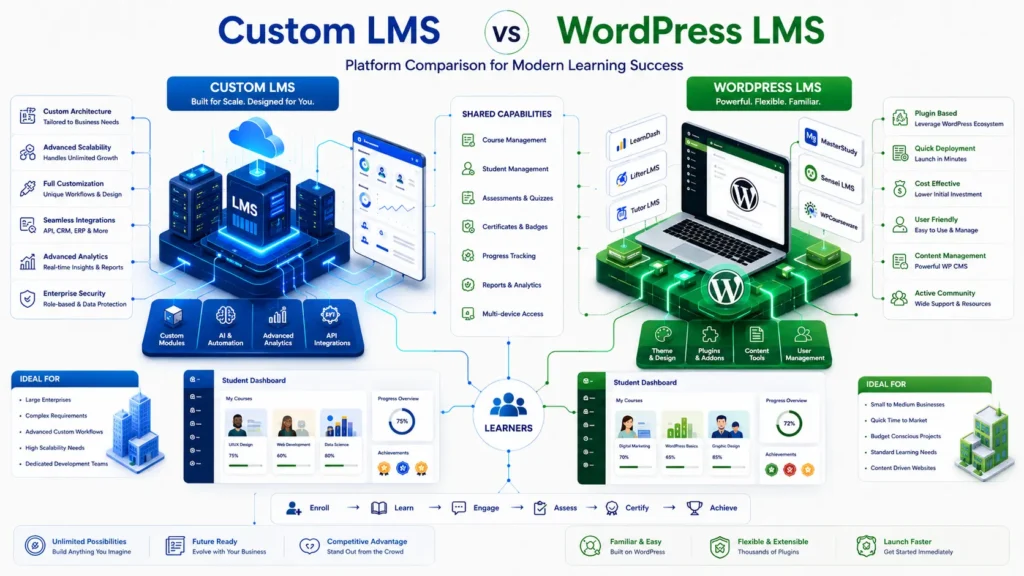
The WordPress LMS Model
Building on WordPress means starting with the world’s most popular CMS and layering an LMS plugin on top of it. The plugin handles the learning mechanics — course structure, quizzes, progress tracking, certificates, drip content. WordPress handles the content management and, usually, the storefront.
This is a configuration model. You are assembling pre-built parts to create a functioning platform. The parts are good. Many of them are genuinely excellent. But they were built to serve the average course creator, which means they are optimized for the average use case — not yours specifically.
The Custom LMS Architecture
A custom LMS is built from the ground up using modern frameworks — typically the MERN stack, Laravel, or Python/Django depending on the specific requirements. This is an engineering model. You define exactly what the platform needs to do, and the code is written to do precisely that — nothing more, nothing less.
There is no bloat. There are no plugin conflicts. There are no licensing fees for features you do not use. And there are no architectural decisions made by someone else that you cannot change. Every component exists because it earns its place. For a full technical reference on modern web application architectures, the MDN Web Docs provide a comprehensive overview
3. Performance: Where the Gap Becomes Visible
Performance is where the Custom LMS vs WordPress LMS gap first becomes impossible to ignore — and where it has the most direct impact on your business metrics.
Educational platforms are database-intensive by nature. Every video progress save, every quiz attempt, every user profile load, every certificate generation hits the server. Under low traffic, WordPress handles this comfortably. Under real load — a live launch, a viral moment, a major promotion — a plugin-heavy WordPress LMS often buckles.
The reason is architectural. WordPress was designed as a content management system, not as a high-concurrency application server. Every page load triggers a cascade of database queries — from WordPress core, from each active plugin, from your theme. When you have hundreds of students accessing the platform simultaneously, those queries compound quickly.
A custom LMS built for your specific traffic patterns can be optimized at every layer — database queries, caching strategy, asset delivery, API response times. The result is a platform that feels fast at ten students and equally fast at ten thousand. That consistency is what your students experience as reliability, and what your business experiences as lower churn.
Google’s Core Web Vitals documentation explains exactly how performance metrics translate into search visibility and user experience scores.
4. Scalability: The Ceiling You Cannot See Until You Hit It
Scalability is the invisible variable in the Custom LMS vs WordPress LMS comparison. It does not matter at launch. It matters enormously six months later.
How WordPress LMS Scales
WordPress scales horizontally — you add more server resources and the platform handles more traffic. This works up to a point. The limitation is not the server; it is the architecture. Plugin-heavy WordPress installations carry significant overhead that does not disappear with more CPU or RAM. The database schema that works for five hundred students starts showing strain at five thousand. The query patterns that felt acceptable at low volume become expensive at scale.
How Custom LMS Scales
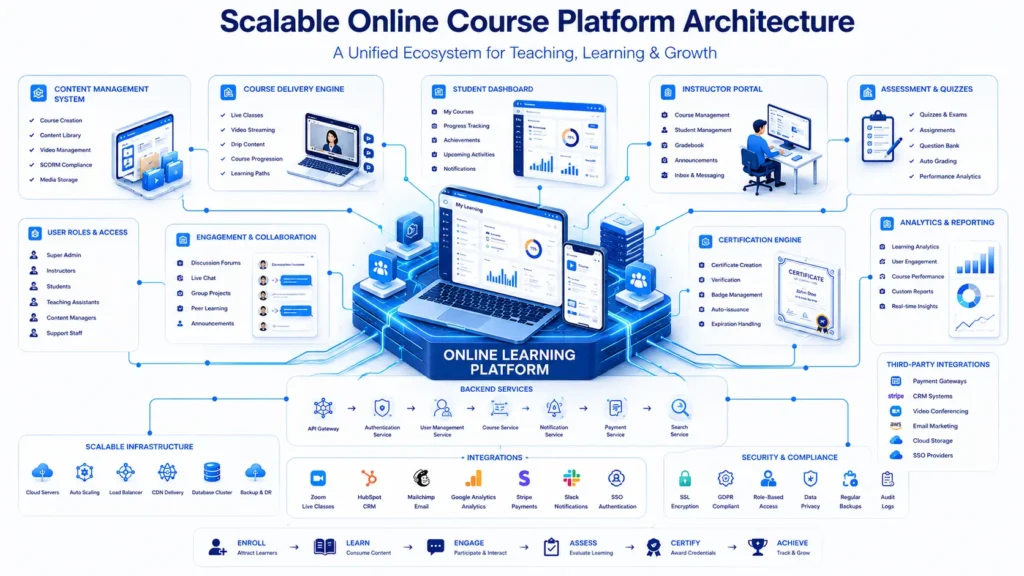
A custom LMS is architected for scale from day one. The database schema is designed for your specific data model. The queries are optimized for your specific access patterns. The caching layer is built around your specific content delivery requirements. When traffic spikes, the system handles it because it was designed to — not because you threw more hardware at a fundamentally inefficient architecture.
For platforms expecting significant growth, this distinction is worth understanding before it becomes urgent. Our guide on multi-vendor marketplace architecture covers many of the same scalability principles that apply to large-scale LMS platforms: /multi-vendor-marketplace-architecture
5. Customization: The Plugin Ceiling vs. Unlimited Flexibility
What WordPress LMS Can Customize
WordPress gives you genuine flexibility within its ecosystem. You can customize the appearance extensively, configure most plugin behaviors, and extend functionality with additional plugins or custom code. For standard course platform needs — video lessons, quizzes, certificates, progress tracking — this is usually sufficient.
The ceiling appears when your requirements diverge from what the plugin ecosystem was designed to support. Real-time collaborative coding environments. AI-driven personalized learning paths. Custom assessment engines with adaptive difficulty. Deep CRM integrations with complex business logic. These are not plugin problems. They are architectural problems that no amount of WordPress configuration can solve cleanly.
What Custom LMS Can Build
A custom LMS has no ceiling. If a feature can be built, it can be built into your platform — exactly the way your business logic requires, integrated seamlessly with everything else, without the workarounds and compromises that plugin-based solutions inevitably introduce.
This is where the Custom LMS vs WordPress LMS comparison becomes most relevant for businesses with differentiated products. If your competitive advantage depends on a unique learning experience that no off-the-shelf tool can replicate, custom development is not just the better option — it is the only option.
6. Security and Data Ownership
The WordPress Security Reality
WordPress powers over 40% of the web, which makes it the most targeted CMS for security vulnerabilities. Most of those vulnerabilities do not originate in WordPress core — they originate in plugins. A plugin that has not been updated in six months, a theme with a known vulnerability, a third-party integration with weak authentication — any of these can become the entry point for a breach.
For B2B companies serving enterprise clients, this is not an abstract risk. Security compliance is a contract requirement. And explaining to an enterprise client that their learner data was compromised through a plugin conflict is not a conversation anyone wants to have.
Custom LMS Security Architecture
A custom LMS eliminates third-party plugin risk almost entirely. The attack surface is dramatically smaller. Security audits are straightforward because every component of the system is known and documented. Compliance requirements — GDPR, CCPA, SOC 2 — can be built into the architecture from the beginning rather than retrofitted through plugins.
Data ownership is the other dimension here. On a WordPress platform, your data sits inside a database schema designed by WordPress and structured around plugin requirements. On a custom platform, your data model is yours — designed around your business logic, portable to any infrastructure, and fully under your control.
7. Cost: The Honest Math Over Three Years
The upfront cost comparison between Custom LMS vs WordPress LMS is not close. WordPress wins that comparison every time. A WordPress LMS can be launched for a few thousand dollars. A custom LMS typically requires a minimum of three to six months of development investment.
But the upfront cost comparison is the wrong question. The right question is total cost of ownership over three years — and that calculation looks very different.
The Hidden Costs of WordPress LMS
Plugin licensing fees add up. A professional LearnDash license, a membership plugin, an affiliate system, a certificate tool, a community platform — you are looking at hundreds to thousands of dollars annually in recurring fees, before any development costs.
Developer time to manage plugin conflicts, debug compatibility issues, and work around architectural limitations is often the largest hidden cost. A WordPress LMS that requires two developer days per month to maintain costs significantly more over three years than that monthly spend suggests.
Migration cost is the most underestimated factor. When a WordPress LMS hits its ceiling and a custom rebuild becomes necessary, the migration project — data transfer, user progress mapping, URL redirects, SEO preservation — is typically one of the most expensive development projects a course business undertakes. Choosing the right architecture from the beginning is almost always cheaper than migrating later.
The Real ROI of Custom LMS
A custom LMS has higher upfront costs and lower ongoing costs. No plugin licensing. No compatibility maintenance. No architectural workarounds. And no migration project in year three because the platform was built to scale from the beginning.
For businesses projecting significant growth, the crossover point — where custom development becomes the more economical choice — typically arrives within two to three years.
8. Comparison Table: Custom LMS vs WordPress LMS
Feature | WordPress LMS | Custom LMS
———————|————————-|—————————
Launch Time | Fast (Days/Weeks) | Moderate (Months)
Initial Cost | Low | High
Scalability | Limited by Plugins | Unlimited
Maintenance | Frequent Updates | Managed/Proactive
Customization | Plugin-Dependent | Unlimited
Performance | Variable (often slow) | Optimized for Speed
Security | Plugin-dependent risk | Full control
Data Ownership | Partial | Complete
Long-Term Cost | Higher (hidden costs) | Lower (no licensing)
Best For | MVPs, Solo Creators | Scaling Brands, Enterprise
9. Common Mistakes That Cost Course Businesses Dearly
Over-Relying on Plugins
Adding plugin after plugin to solve individual problems is the most common path to a broken WordPress LMS. Each plugin adds database queries, JavaScript, and CSS to every page load. Each plugin introduces a potential conflict with every other plugin. The compounding effect is a platform that gets slower and more fragile with every feature you add.
Ignoring Mobile Experience
Modern learners expect a Netflix-level experience on mobile. Generic WordPress themes and LMS plugin interfaces were not designed with that standard in mind. If your students are completing courses on their phones — and the majority of them are — a poor mobile experience is a direct driver of churn that never shows up clearly in your analytics.
Underestimating Technical Debt
Choosing a quick fix today that blocks a better architecture tomorrow is expensive. The workarounds accumulate. The plugin conflicts compound. The performance problems multiply. And eventually, the cost of the technical debt exceeds the cost of the custom build that would have solved the problem from the start.
Skipping Load Testing
Launching a major course cohort without stress-testing your platform for simultaneous access is a risk that plays out in public. When your platform goes down during your biggest launch because three hundred students tried to access it at the same time, the damage to your brand reputation is harder to repair than the technical problem itself.
Missing SEO Architecture
LMS plugin templates are not built for SEO. Course pages with thin content, generic URL structures, and no schema markup leave significant organic traffic on the table. A custom LMS can be built with search visibility as a first-class concern from day one — not an afterthought.
–
Frequently Asked Questions
Q: What is the main difference between Custom LMS vs WordPress LMS?
A: A WordPress LMS uses the WordPress CMS combined with a learning plugin like LearnDash or LifterLMS to create a course platform quickly. A custom LMS is built from scratch using modern frameworks, designed specifically around your business requirements. WordPress is faster and cheaper to launch. Custom is faster and cheaper to scale.
Q: Is WordPress really bad for large-scale e-learning?
A: WordPress is not bad — it has real limitations at scale. At a certain volume of concurrent users, the overhead of the WordPress database schema and plugin architecture becomes a performance bottleneck that more server resources alone cannot solve. If you plan to serve thousands of concurrent users with complex learning workflows, a custom architecture is the more reliable professional choice.
Q: How long does a custom LMS build take?
A: A professional custom LMS build typically takes three to six months, depending on complexity. This includes discovery and requirements definition, UI/UX design, development, testing, and deployment. The timeline is longer than WordPress, but the resulting platform is built specifically for your requirements rather than configured from generic parts.
Q: Can I migrate from WordPress LMS to a custom platform later?
A: Yes, but it is a significant project. Migration involves transferring user data, mapping course progress, preserving SEO through redirect management, and potentially re-integrating payment and CRM systems. It is always cheaper and less disruptive to choose the right architecture from the beginning than to migrate under pressure later.
Q: Which platform is more secure for enterprise clients?
A: A custom LMS is generally more secure because it eliminates the third-party plugin attack surface that makes WordPress installations vulnerable. The codebase is smaller, every component is known and documented, and security audits are straightforward. For enterprise clients with compliance requirements, custom development provides a much cleaner security posture.
Q: Does a custom LMS include e-commerce functionality?
A: Yes. Custom LMS platforms can include fully integrated payment gateways, subscription billing, multi-tier pricing models, affiliate systems, and any other commercial functionality your business requires — all built natively into the platform rather than bolted on through plugins.
Q: What tech stack is typically used for a custom LMS?
A: The most common choices are the MERN stack (MongoDB, Express, React, Node.js) for JavaScript-centric teams, Laravel for PHP-based architectures, and Python/Django for data-heavy platforms. The right choice depends on your team’s expertise, your performance requirements, and your integration needs.
The Bottom Line
The Custom LMS vs WordPress LMS decision ultimately comes down to one question: are you building a course site, or are you building a course business?
A course site can live comfortably on WordPress for years. It is manageable, affordable, and good enough for a large range of use cases. If you are a solo creator or a small team testing a concept, WordPress is the right starting point.
A course business — one that competes on experience, scales to thousands of students, integrates deeply with its tech stack, and protects its learner data with enterprise-grade security — will eventually need infrastructure that was built for that purpose. The question is not whether you will need it. It is whether you build it before or after the WordPress ceiling forces your hand.
The businesses that get this right invest in the right architecture at the right time — before scaling pressure exposes the gaps. The ones that get it wrong spend significantly more rebuilding under pressure, managing the fallout of platform failures, and explaining to enterprise clients why their data sits on a shared plugin infrastructure.
Ready to Build an E-Learning Platform That Actually Scales?
If you are planning to launch or upgrade your online course business, we can help you make the right architectural decision — and build it the right way.
More Blog

High-Availability Cloud Infrastructure: 5 Proven Steps

Nginx Redis Caching Optimization: 6 Proven Speed Tactics

Content Optimization for AI Search: 5 Proven Steps to Rank



