
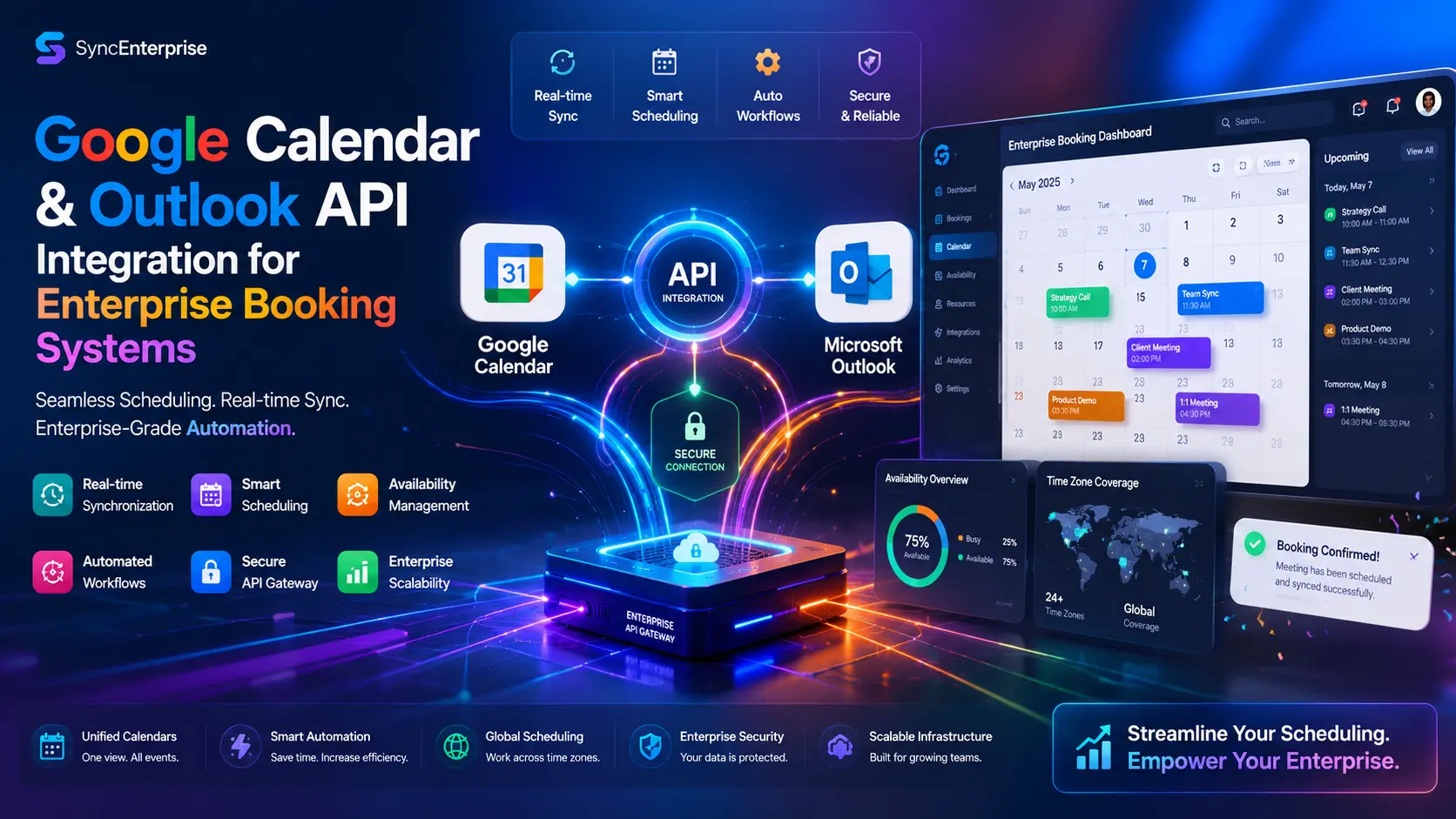
Calendar API Integration: 5 Proven Enterprise Steps

Google Calendar and Outlook API Integration for Enterprise Booking Platforms
Calendar API integration is no longer a premium add-on you bolt on after your MVP goes live — it is the foundation that separates a real product from a glorified contact form. If you are building a booking platform, a marketplace, or any kind of service-based web application in 2026, your users expect their calendars to just work. Not eventually. Not after a manual refresh. Right now, the moment an appointment is confirmed.
When your application speaks fluently to both Google Workspace and Microsoft 365, you stop functioning as a static directory and start operating as a live, responsive scheduling engine that runs seamlessly in the background. This guide is a complete engineering blueprint for building a bi-directional, high-availability calendar sync system. We will cover OAuth 2.0 authentication, webhook architecture, time zone handling, rate limit strategies, and the security practices that enterprise clients expect before they will even sign a contract.
Whether you are a solo developer building your first SaaS product or an engineering lead designing a multi-tenant platform, this document gives you everything you need to build it right.
Short Answer
Calendar API integration connects your booking platform directly to Google Calendar and Microsoft Outlook via secure OAuth 2.0 protocols. This enables real-time bi-directional synchronization of availability, automatic creation of calendar events upon booking, webhook-driven instant updates when meetings are rescheduled or canceled, and enterprise-grade conflict resolution. When implemented correctly, it eliminates double-bookings, removes manual scheduling overhead, and creates a scheduling infrastructure that scales with your business.
Why Manual Syncing Fails at Enterprise Scale
Most developers underestimate how quickly a manual or iCal-export-based scheduling process breaks down at scale. What works for ten appointments a week becomes completely unmanageable at hundreds or thousands of monthly bookings — and the failures that result are not just operational inconveniences. They are trust problems that are slow and expensive to repair.
The Double Booking Trap shows up in three predictable ways at the enterprise level.
The first is operational debt. Staff spend hours every week reconciling calendars scattered across email clients, CRMs, and booking tools. That time compounds into thousands of dollars in lost productivity over a quarter. Nobody is doing high-value work during those reconciliation hours — they are doing work that Calendar API integration would eliminate entirely.
The second is brand erosion. Nothing destroys professional credibility faster than a client arriving for a meeting that somehow never appeared on anyone’s calendar. That kind of mistake tends to be remembered long after the inconvenience fades. Enterprise clients have long memories, and a single scheduling failure can influence contract renewal conversations months later.
The third is revenue leakage. Disconnected booking flows create friction at exactly the wrong moment — checkout. Every extra click, every manual confirmation email, every sync delay is a conversion that did not happen. At scale, the compounding effect of that friction translates directly into lost revenue that never shows up clearly on any dashboard.
The only sustainable solution is a Calendar API integration that removes the human from the loop entirely. When your system writes directly to the calendar and listens for changes in real time, all three of those problems disappear.
If your platform also manages product catalogs or e-commerce operations alongside bookings, see our guide on e-commerce product feed optimization: /ecommerce-product-feed-optimization
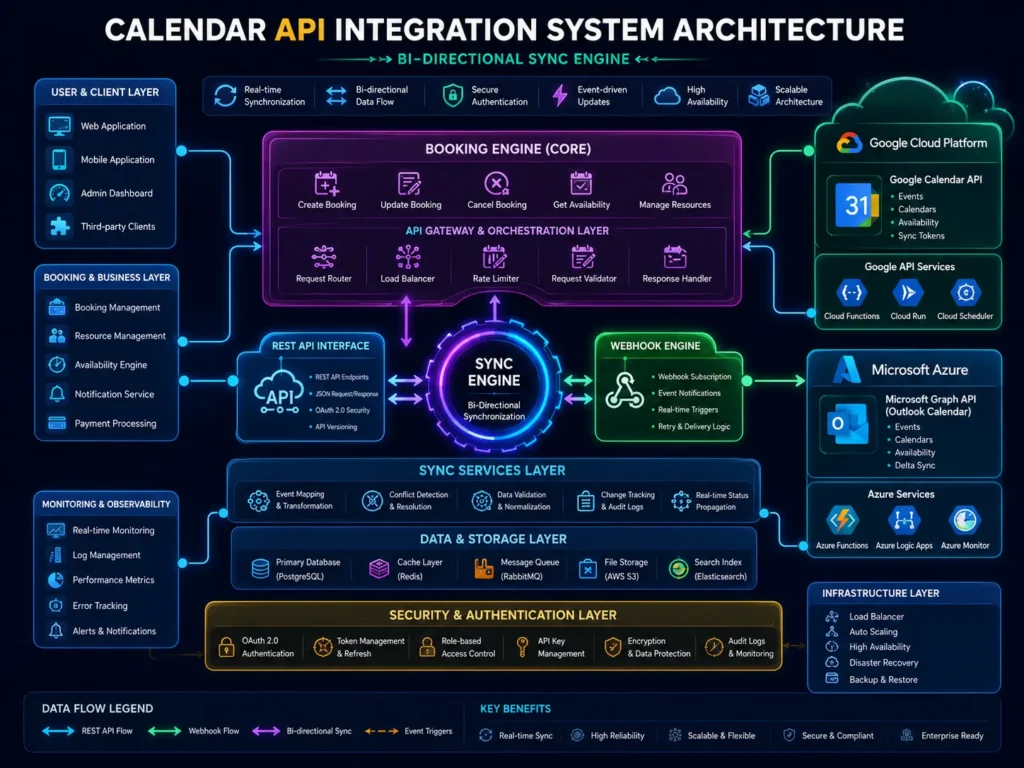
Core Technical Architecture: The Bi-Directional Bridge
Here is where most calendar integrations fall short: they are one-directional. They push events out from the booking platform into the user’s calendar and call it a day. But a user can still open Google Calendar, delete the event manually, and your system has absolutely no idea it happened.
True enterprise-grade Calendar API integration requires three distinct components working together.
The Write Channel (Outbound)
This is the outbound leg of the architecture. When a booking is confirmed in your platform, your system fires an API request to the appropriate calendar vendor — Google or Microsoft — and creates the event directly in the user’s calendar. Building this correctly requires idempotent calls, proper error handling, and immediate storage of the vendor-assigned Event ID. That Event ID is your system’s permanent reference to that calendar event — without it, you cannot update or delete the event through the API, ever. Always store it at the exact moment of creation alongside your internal booking record.
The Listen Channel (Inbound)
This is where webhooks come in. Instead of your server constantly polling and asking “did anything change?”, the calendar vendor sends a push notification to your registered endpoint the moment a user modifies or deletes an event on their end. Your system catches that signal and updates its own database in real time. No polling overhead. No data lag. No missed changes. This is what makes the integration feel alive rather than periodic.
The Conflict Resolver (Brain)
The most underrated part of the architecture. When data changes happen simultaneously on both ends — your platform updates an event at the exact moment a user reschedules it in Outlook — you need a clearly defined Source of Truth. Which system wins? In most enterprise setups, the booking platform takes precedence, but this must be an explicit architectural decision, not an afterthought you figure out after a production incident. Document it, implement it deliberately, and make sure your entire engineering team understands the rule.
Step-by-Step Implementation: From Auth to Sync
Before any sync logic gets written, you need your applications registered with each vendor and your OAuth 2.0 flow working correctly. Skipping this step, or doing it halfway, is the single most common reason integrations break silently in production.
Registering Your Application
For Google Calendar API, everything starts inside the Google Cloud Console. Create a new project, enable the Google Calendar API from the API library, and configure your OAuth consent screen carefully. Pay close attention to your authorized redirect URIs — even a trailing slash mismatch will cause authentication failures that are genuinely painful to debug.
For Microsoft Outlook via the Microsoft Graph API, head to the Azure AD portal, now branded as Entra ID. Register your application, navigate to API permissions, and add only the Microsoft Graph API scopes you actually need. At minimum: Calendars.ReadWrite and offline_access. Do not request Mail.Read or Contacts.Read unless your application genuinely needs them — scope minimization is both a security best practice and a signal of professionalism to enterprise clients reviewing your integration.
Mastering the OAuth 2.0 Flow
OAuth 2.0 is the authentication backbone for both integrations. Understanding the flow in detail saves significant debugging time later. Here is how it works:
Authorization Code Grant — Your platform redirects the user to the vendor’s login page, passing your client ID and the specific scopes you are requesting. The user authenticates and grants permission.
Token Exchange — After the user consents, the vendor redirects back to your registered URI with a short-lived authorization code. You exchange this code server-side for two tokens: an Access Token valid for approximately 60 minutes and a Refresh Token that is long-lived, sometimes indefinite depending on vendor configuration.
Silent Refresh — This is where most developers make mistakes. You must implement an automatic token refresh mechanism that uses the Refresh Token to obtain a new Access Token before the old one expires. If you do not build this correctly, users will randomly lose their calendar connection without any clear error, and your support queue will reflect it. Design your system to check token validity before every API call, refresh proactively if the token
Store tokens securely, encrypted at rest using AES-256 encryption, never in plain text. A stolen token is a stolen calendar connection — treat token storage with the same seriousness as password storage.
Advanced Engineering: Designing a Scalable Sync Engine
Getting a basic Calendar API integration working is one milestone. Building one that handles thousands of concurrent users without degrading under load is a completely different engineering challenge.
Time Zone Standardization Protocol
Time zone handling is the most common source of silent, hard-to-reproduce bugs in calendar integrations. Everything looks correct in testing until a user in a different region discovers their 10 AM appointment is appearing as a 3 AM calendar block — and by then the reviews have already been written.
Real-Time Webhook Ingestion via Redis
Polling the vendor API every 60 seconds for changes is inefficient and a fast path to hitting rate limits. The correct approach is a webhook-driven architecture, and pairing it with Redis makes it production-ready at scale.
Here is the flow: the calendar vendor sends a POST request to your registered webhook endpoint whenever a calendar event is created, modified, or deleted. Your endpoint receives the notification and immediately pushes it into a Redis message queue, returning a 200 OK right away — this matters, because vendors will retry failed webhook deliveries and you do not want cascading duplicate events. A background worker then picks up the queued item, processes the change, updates your database, and reflects the new state on the frontend.
This architecture fully decouples event ingestion from event processing, which means high-traffic periods do not overwhelm your server or introduce data inconsistencies.
Handling API Rate Limits and Batching
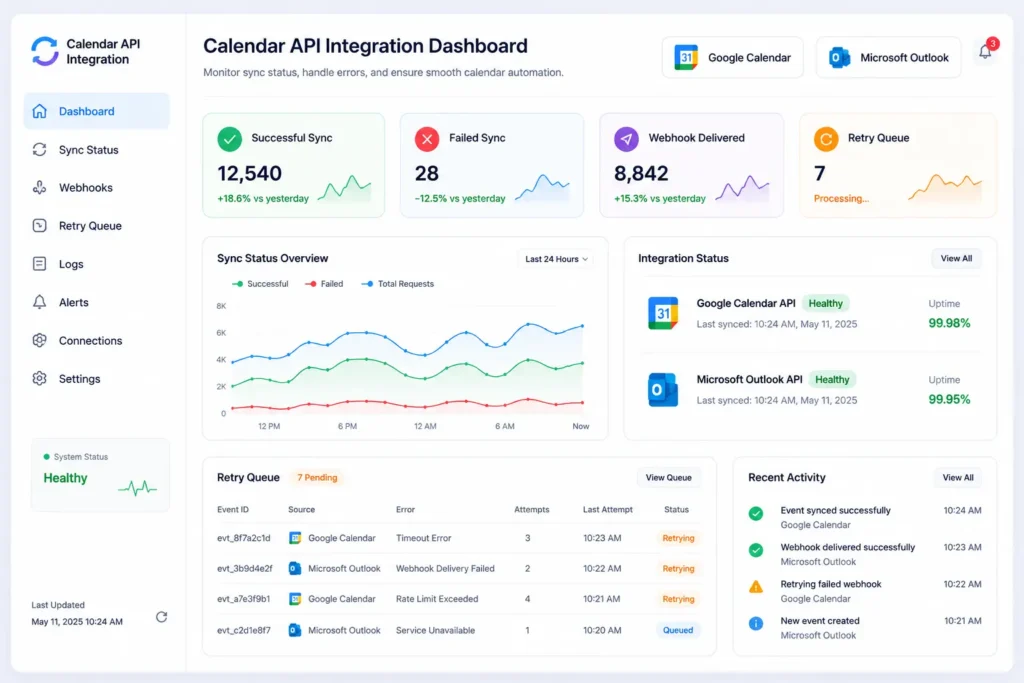
Both Google Calendar API and Microsoft Graph API enforce usage quotas. Exceed those limits and your Calendar API integration goes offline. Users see stale data, operations start failing silently, and the investigation that follows is never straightforward.
Batching Requests
If a user has 50 calendar updates queued — say, after importing a full month of appointments from another system — do not send 50 individual API requests. Both Google and Microsoft provide batch endpoints that let you bundle multiple operations into a single HTTP transaction. This is dramatically more efficient, reduces your total quota consumption, and keeps you well within safe thresholds even during high-volume periods.
Exponential Backoff
When your system receives a 429 Too Many Requests response, the worst possible reaction is an immediate retry. Instead, implement exponential backoff: wait 1 second before the first retry, 2 seconds before the second, 4 seconds before the third, and continue doubling. Most vendor 429 responses also include a Retry-After header telling you exactly how long to wait — read it and respect it. This pattern makes your Calendar API integration self-healing without requiring any manual intervention when quota limits are briefly hit.
Security: Compliance and Data Privacy
Calendar data is genuinely sensitive. It tells you where someone is going, who they are meeting, and what projects they are working on. Enterprise clients will ask about your security architecture before signing — and they should.
A defensible security posture for Calendar API integration includes several non-negotiable practices.
Encryption at rest is the starting point. Refresh Tokens must be stored using AES-256 encryption. A stolen token gives an attacker full access to a user’s calendar — treat it accordingly.
Scope minimization matters both for security and for user trust. Only request the API permissions your application genuinely needs. Enterprise security reviewers will flag broad scopes, and users notice when a booking application requests access to their email.
GDPR and CCPA compliance requires a clearly labelled “Disconnect Calendar” option in user settings. Activating this must trigger a cascade delete: all stored tokens, all calendar-related metadata, and any synced event data must be purged from your servers. Log the deletion event for your compliance audit trail.
For teams operating in regulated industries, also consider dedicated token vault services, comprehensive audit logging for all API calls, and regular penetration testing of your webhook endpoints.
Troubleshooting: Common Pitfalls and Edge-Case Failures
Even well-architected Calendar API integrations run into edge cases under real-world conditions. These are the three failure modes that show up most often.
The Phantom ID Problem
When you create a calendar event via the API, the vendor returns a unique EventID for that specific event. If you do not store that ID in your own database at the exact moment of creation, you have permanently lost the ability to update or delete that event through the API. The event exists on the user’s calendar, your system has no reference to it, and manual cleanup is the only resolution. Always store the vendor-assigned EventID alongside your internal booking record.
Webhook Droppage
Webhooks are not guaranteed delivery. Network interruptions, server restarts, and occasional vendor-side issues can cause notifications to go missing in transit. The protection against this is a Validation Loop: a low-frequency background job — typically running once every 24 hours — that queries the vendor API directly and compares your stored event states against the live calendar data. Any discrepancies are flagged and corrected automatically. This becomes your safety net for everything the real-time webhook architecture might occasionally miss.
Token Expiry Ignorance
Assuming a stored Access Token will still be valid the next time you need it is the leading cause of calendar sync support tickets. Access Tokens expire, typically within 60 minutes. Design your system to check token validity before every API call, refresh proactively if the token is within five minutes of expiry, and handle refresh failures with a clear user-facing error state rather than failing silently.
Direct API Integration vs. Third-Party Scheduling Tools
Before committing to a custom Calendar API integration, it is worth understanding the trade-offs between building it yourself and using an existing scheduling tool.
For businesses in early stages, third-party tools like Calendly or HubSpot Meetings are a perfectly reasonable starting point. The case for custom Calendar API integration becomes compelling when your scheduling workflow has specific logic that off-the-shelf tools cannot accommodate — multi-resource booking, complex availability rules, deep CRM integration, or a need for the booking experience to feel completely native to your platform. It also becomes compelling at scale, where recurring subscription costs add up and data ownership becomes a strategic priority.
Frequently Asked Questions
Q: What is Calendar API integration?
A: Calendar API integration is the process of connecting a web application directly to calendar services like Google Calendar or Microsoft Outlook through their official APIs. It allows your platform to create, read, update, and delete events programmatically, and to receive real-time notifications when calendar data changes — eliminating the need for any manual synchronization between systems.
Q: How does OAuth 2.0 work with Google Calendar API?
A: OAuth 2.0 is the authorization framework that allows your application to access a user’s Google Calendar securely without ever handling their password. The user is redirected to Google’s login page, grants your application specific permissions called scopes, and Google returns tokens your server uses to make API calls on their behalf. The Refresh Token keeps the connection alive long-term without requiring the user to log in repeatedly.
Q: What is the difference between Google Calendar API and Microsoft Graph API?
A: Google Calendar API is the integration layer for Google Workspace calendars, configured through the Google Cloud Console. Microsoft Graph API is Microsoft’s unified API surface covering Outlook calendars and other Microsoft 365 services, registered through the Azure AD portal. Both use OAuth 2.0, support webhooks for real-time sync, and enforce rate limits — but they differ in endpoint structure, scope naming conventions, and quota thresholds.
Q: What is bi-directional calendar synchronization?
A: Bi-directional sync means data flows in both directions: your platform pushes events to the user’s calendar (outbound), and the user’s calendar notifies your platform when something changes manually (inbound). Most basic integrations only handle the outbound direction, which is why double-bookings and stale data remain common. True bi-directional sync requires webhook listeners in addition to write API calls.
Q: How do I prevent hitting API rate limits with Google Calendar or Microsoft Graph?
A: Use request batching to combine multiple operations into single API calls, and implement exponential backoff when you receive 429 responses. Adopting a webhook-driven architecture also reduces reliance on polling-based calls significantly, which is one of the most effective ways to stay within daily quota limits during high-traffic periods.
Q: Is Calendar API integration secure enough for enterprise clients?
A: Yes, when implemented correctly. OAuth 2.0 ensures your application never stores user passwords. Tokens are scoped to only the permissions your application needs. AES-256 encryption for token storage, scope minimization, GDPR-compliant data deletion flows, and comprehensive audit logging together form a security posture that holds up under enterprise security reviews.
Q: How are meeting cancellations handled automatically?
A: Through webhooks. When a user cancels or removes an event from their calendar, the calendar provider sends a notification to your server. Your booking system receives that notification, identifies the corresponding booking, updates its status, and frees the slot for other clients to book. The same mechanism handles reschedules — a time change in the calendar triggers an update in your booking system’s database.
The Bottom Line
Building a reliable, bi-directional Calendar API integration is not a quick weekend project. It requires careful thinking about authentication persistence, data consistency under concurrent updates, security practices that hold up under enterprise scrutiny, and failure recovery patterns that work without human intervention.
But it is also one of the highest-leverage engineering investments you can make for any booking platform — because when it works, it is invisible. When it does not, the consequences are immediate and visible to every user.
The teams that get this right follow a few consistent principles: they store everything in UTC without exception, they treat webhooks as unreliable and build validation loops to compensate, they minimize OAuth scopes to exactly what is needed, and they design their token refresh logic to be proactive rather than reactive. Those four practices alone eliminate the vast majority of calendar sync failures seen in production.
If your platform is at the stage where this needs to be built correctly the first time, the engineering investment pays for itself quickly — in reduced support overhead, fewer scheduling failures, and the confidence of enterprise clients who have seen too many integrations done poorly.
Ready to Build Your Enterprise Calendar API Integration?
We architect and build complex enterprise integrations — across custom booking platforms, multi-vendor marketplaces, and SaaS tools that need to work reliably at scale
More Blog

High-Availability Cloud Infrastructure: 5 Proven Steps

Nginx Redis Caching Optimization: 6 Proven Speed Tactics

Content Optimization for AI Search: 5 Proven Steps to Rank



